On production, SePay CLI only reads orders: pg order list and pg order get (Read orders on production). The other pg commands run on the sandbox only, with simulated data; on production, use the Payment Gateway API or my.sepay.vn.
Test your Payment Gateway IPN handler on sandbox before production with the pg commands of SePay CLI. They create a sandbox order and forward its IPN to a handler on your machine. For concepts and payment flows, see Introduction, Payment flows and IPN.
You need to be signed in, with Test mode enabled for your company. pg ipn set, pg order cancel and pg order void run on the sandbox only and ask for confirmation; without a terminal, add --yes.
Command order for a test order:
pg ipn set → pg ipn listen → pg checkout init → (customer pays) → pg order get
sepay webhook listendoesn't receive Payment Gateway order notifications; this group usespg ipn listen.pg ordercommands take the invoice number (order_invoice_number) you set when creating the order, for exampleHD1709, not an xid. In a terminal, leave it out and the CLI lets you pick the order from a list; in a script, a missing invoice number fails with exit code 2.
pg auth and pg merchant get
The CLI fetches sandbox credentials when it needs them and never prints the secret. Check that they're ready:
$ sepay pg authenv: sandboxPRODUCT ENV AUTH MERCHANTpg sandbox basic DEV-SEPAY-DEMO--refresh fetches a new set; --insecure-storage stores the credentials in a 0600 file instead of the keychain.
See the merchant's payment methods and which ones are on:
$ sepay pg merchant getenv: sandboxPAYMENT METHOD ACTIVECARD yesBANK_TRANSFER yesNAPAS_BANK_TRANSFER yespg ipn set
Set the IPN URL before you create an order: without one, SePay sends no IPN, and pg ipn listen has nothing to copy.
Parameters
| Parameter | Type | Required | Description |
|---|---|---|---|
<url> | string | Yes | A public http or https URL reachable from the internet; SePay rejects localhost and internal addresses |
--secret | string | No | A string of your choice that SePay sends in the X-Secret-Key header; - reads it from stdin. Passing --secret turns authentication on automatically |
--active | bool | No | --active turns IPN delivery on, --active=false turns it off |
--auth-type | string | No | SECRET_KEY, or leave empty to turn authentication off |
--content-type | string | No | The IPN request content type: application/json |
The command changes only what you pass. A flag you leave out keeps its stored value, so setting a new URL doesn't turn authentication off. In a terminal, with neither --secret nor --auth-type, the CLI asks whether to keep the current secret, type a new one (hidden) or turn authentication off. If the CLI can't read the stored config, it asks nothing, keeps the stored authentication and prints could not read the current config; keeping the stored auth (pass --secret or --auth-type to change it); to change it, pass --secret or --auth-type.
Example
Set the IPN address with a secret:
$ sepay pg ipn set https://example.com/sepay/ipn --secret <secret>Show the stored IPN settings:
$ sepay pg ipn getenv: sandboxURL: https://example.com/sepay/ipnAuth: SECRET_KEYContent: application/jsonSecret: ****1234Active: yesEach merchant has one IPN configuration. Once set, the secret only ever shows masked; you can't read it back.
pg ipn listen
Forwards a copy of each IPN to a handler on your machine. The command doesn't open a port on your machine: SePay still sends the IPN to the IPN URL, and the CLI pushes an extra copy to your handler.
Parameters
| Flag | Type | Required | Description |
|---|---|---|---|
--forward | string | In scripts | Handler address. In a terminal, the CLI prompts if you omit it |
--print | bool | No | Print the full payload |
--events | string[] | No | Forward only these types: ORDER_PAID, TRANSACTION_VOID |
--order | string | No | Forward only IPNs for the order with this order ID (order_id, for example PAY36AE748559932D), not the invoice number |
Other flags: sepay pg ipn listen --help.
Example
$ sepay pg ipn listen --forward localhost:3000/ipn✓ Listening for sandbox gateway IPN → http://localhost:3000/ipn (Ctrl+C to stop · retries+enter to manage)14:31:52 ORDER_PAID → http://localhost:3000/ipn 200 38ms order=HD1709order= is the invoice number, which you can pass straight to pg order get. IPN structure and authentication: Payment Gateway IPN.
Notes
- Each copy carries the same body and headers your IPN URL just received, so your handler runs its
X-Secret-Keycheck too. That header goes only to a handler on your machine (localhost); any other address doesn't get it unless you add--forward-credentials. --headersprints the request headers, with credential values such asX-Secret-Keyredacted.- The command copies SePay's first delivery only, not SePay's own retries.
- When a delivery to the handler hits a connection error or a timeout, the CLI resends it on SePay's retry schedule (
--forward-retries, default7, at most10;0sends once). The CLI resends only to a handler on your machine. Stoppinglistendrops the pending resends. Details: webhook listen. - A 4xx or 5xx answer from the handler counts as delivered and isn't resent, unlike
webhook listen.
pg checkout init
Creates an order and prints the checkout page URL; in a terminal, the URL opens in your browser automatically.
Parameters
| Flag | Type | Required | Description |
|---|---|---|---|
--amount | string | Yes | Whole VND: greater than 0 for PURCHASE, 0 for VERIFY |
--description | string | Yes | Order description |
--invoice | string | With PURCHASE | Invoice number: letters without diacritics, digits, -, _; up to 100 characters |
--operation | string | No | PURCHASE (default) | VERIFY |
--payment-method | string | No | BANK_TRANSFER | CARD | NAPAS_BANK_TRANSFER, and it must be active on the merchant. If omitted, the customer picks how to pay on the checkout page |
--success-url, --cancel-url, --error-url | string | No | URLs the customer is sent back to after paying, cancelling on their own, or hitting an error. They need a scheme such as https://, no spaces or control characters, up to 2048 characters; javascript:, data:, vbscript:, file:, blob: and about: are blocked. Write http://localhost:3000/done, not localhost:3000/done |
--currency | string | No | Only VND (the default) |
--customer | string | No | Customer ID |
--no-open | bool | No | Only print the URL; don't open the browser |
If the amount, --invoice or a URL is malformed, the CLI stops before creating the order and prints the rejected value. Test payment data: Payment Gateway Sandbox.
Example
Create order HD1709 for 50,000 VND, with three URLs that bring the customer back to the order page:
$ sepay pg checkout init --amount 50000 --description "Payment for order HD1709" --invoice HD1709 --success-url "https://example.com/order/HD1709?payment=success" --cancel-url "https://example.com/order/HD1709?payment=cancel" --error-url "https://example.com/order/HD1709?payment=error"The command prints the checkout page URL to stdout and opens it in your browser:
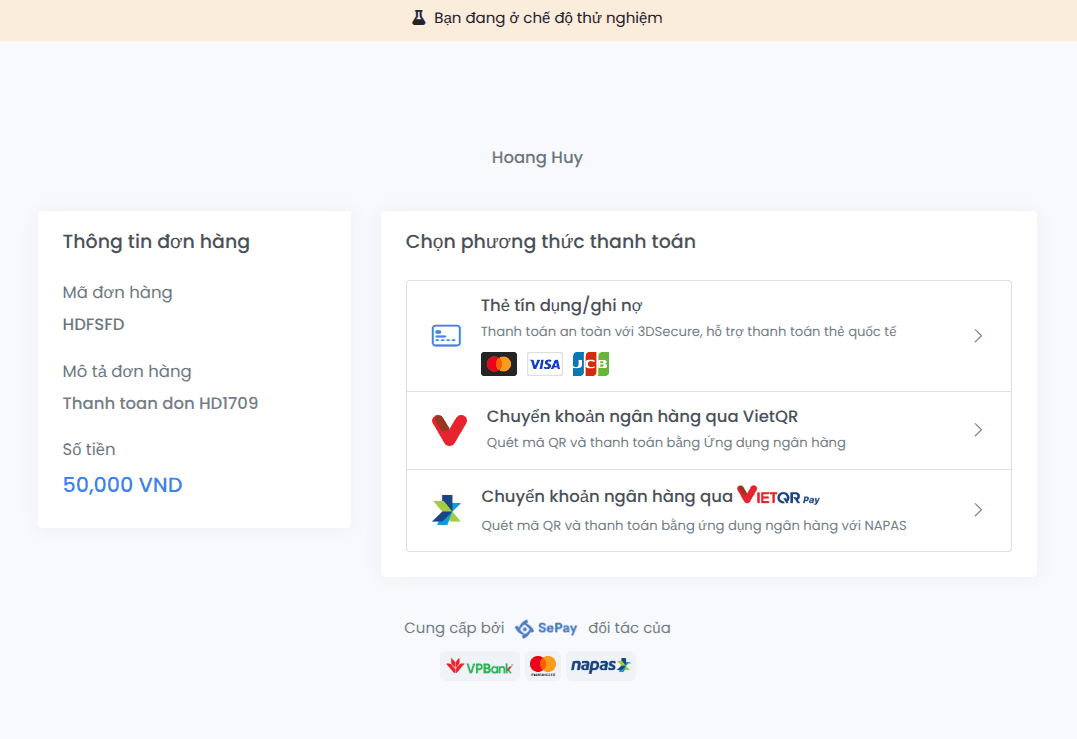
pg order get and pg order list
Show one order by its invoice number:
$ sepay pg order get INV_20261101_801env: sandboxInvoice: INV_20261101_801Order ID: PAY36AE748559932DStatus: CAPTUREDAmount: 50000.00 VNDOrder ID is the value pg ipn listen --order takes. When SePay returns the order's transactions, the command adds a transaction table with card numbers masked. The order description is in --json only.
List paid orders in a date range:
$ sepay pg order list --status CAPTURED --from 2026-09-01 --to 2026-09-25pg order list flag | Type | Description |
|---|---|---|
--status | string | For example CAPTURED, CANCELLED, AUTHENTICATION_NOT_NEEDED; an invalid value makes the command list the valid ones |
--from, --to | string | Date range YYYY-MM-DD |
--search | string | Search by order ID or invoice number |
--customer | string | Customer ID |
--page, --per-page | int | Pagination; up to 100 |
Read orders on production
pg order list and pg order get also run on production. Both only read, so they don't ask for confirmation, and default_env: production counts too. The CLI reads orders with your sign-in session, not the merchant key:
$ sepay pg order list --env production --status CAPTURED --from 2026-11-01 --to 2026-11-09 -o json$ sepay pg order get INV-1001 --env production -o json- The token needs the
pg-order:readscope; without it the command exits with exit code 5 and printstoken lacks the required scope, run: sepay auth refresh --scopes pg-order:read. - Your account needs the Payment Gateway permission in the company; without it, exit code 8,
your account lacks permission for this action; ask an admin of your company. - Amounts are integers (VND), e.g.
"order_amount": 150000; the table'sAMOUNTcolumn prints150.000. pg order getprintsMETHOD TYPE AMOUNT STATUS CARD DATEwhen the order has transactions. For a card transaction,-o jsonhas only the card brand and the last 4 digits,"card": { "brand": "VISA", "last4": "1234" }; no card number, cardholder name or expiry date. Each transaction'spayment_methodis the order's method.- The
-o jsonoutput oflistis an array, with no page information. Read all pages with--page 1, 2, …and the same--per-page(default 20), stopping at a page with fewer rows than--per-page, or when a new page starts with the exactorder_invoice_numberof the previous page. Orders created while you read shift the pages, so keep one row perorder_invoice_number.
Cancelling orders and voiding card transactions on production are not in the CLI yet.
pg order cancel and pg order void
Pick the command by order type and payment state:
| Case | Command |
|---|---|
| Bank transfer (including NAPAS VietQR), customer hasn't paid | sepay pg order cancel HD1709 |
Card, paid (CAPTURED), not yet settled | sepay pg order void HD1709 |
| Card, already settled | No CLI command; refund through the API |
cancel is rejected once the order is CAPTURED or CANCELLED. void is rejected for the wrong order type, or when a card transaction is past the settlement cut-off (Void transaction API). Check the order type and status with pg order get before you run either one.
Both commands ask for confirmation before running, on sandbox too, and no command undoes them.
Error codes
| Message or code | Exit / error_code | Cause |
|---|---|---|
no IPN endpoint configured, IPN delivery is off (pg ipn listen) | Warning; the command keeps running | No IPN URL has been set, or delivery was turned off with --active=false (pg ipn set <url> --active turns it back on) |
this company has no active Payment Gateway merchant (pg ipn listen) | Warning; the command keeps running | The company has no active Payment Gateway merchant; check with pg merchant get |
pg ipn set rejects the URL | 1 / the server's code | The URL is localhost or an internal address; a handler on your machine still receives IPNs through pg ipn listen |
--amount, --invoice or URL errors (checkout init) | 2 / usage_error | The amount isn't a whole number; the invoice number contains /, dots, spaces or letters with diacritics; or a URL has no scheme such as https://, localhost:3000/done included (must include a scheme; write http://localhost:3000/done), or uses a blocked scheme (scheme "vbscript" is not allowed) |
--payment-method CARD is not active on this sandbox merchant (checkout init) | 1 / error | The method isn't active on the merchant; the message lists the active ones |
4000, 4001, 4002 (void) | 1 / 4000, 4001, 4002 | The order is unpaid, was already cancelled, or has no transaction |
Đã có lỗi xảy ra, vui lòng liên hệ SePay để được hỗ trợ. (void) | 1 | A bank-transfer order; void applies to card orders only |