Sign in
Sign in to SePay CLI on your machine with your my.sepay.vn account:
$ sepay loginOpen your browser to authenticate. Your code: WDJB-MJHTOpening https://my.sepay.vn/...✓ Logged in as dev@congty.vnadd another account with: sepay login --profile <name>The CLI prints a device code and opens the device connection page on my.sepay.vn. Enter the code on that page and select Tiếp tục (Continue). The ✓ Logged in as line appears once you're signed in.
While it waits for your approval, the terminal shows a line of keys:
c copy link · y copy code · enter open browser · ctrl+c cancel⠙ waiting for approval…| Key | What it does |
|---|---|
c | Copies the link to the device connection page. |
y | Copies the device code. |
Enter | Opens the browser again, for example after you closed the tab. Not shown on a machine that can't open a browser. |
Ctrl+C or Esc | Cancels the sign-in. |
In a script (no terminal), the CLI only prints the code and the link, then waits.
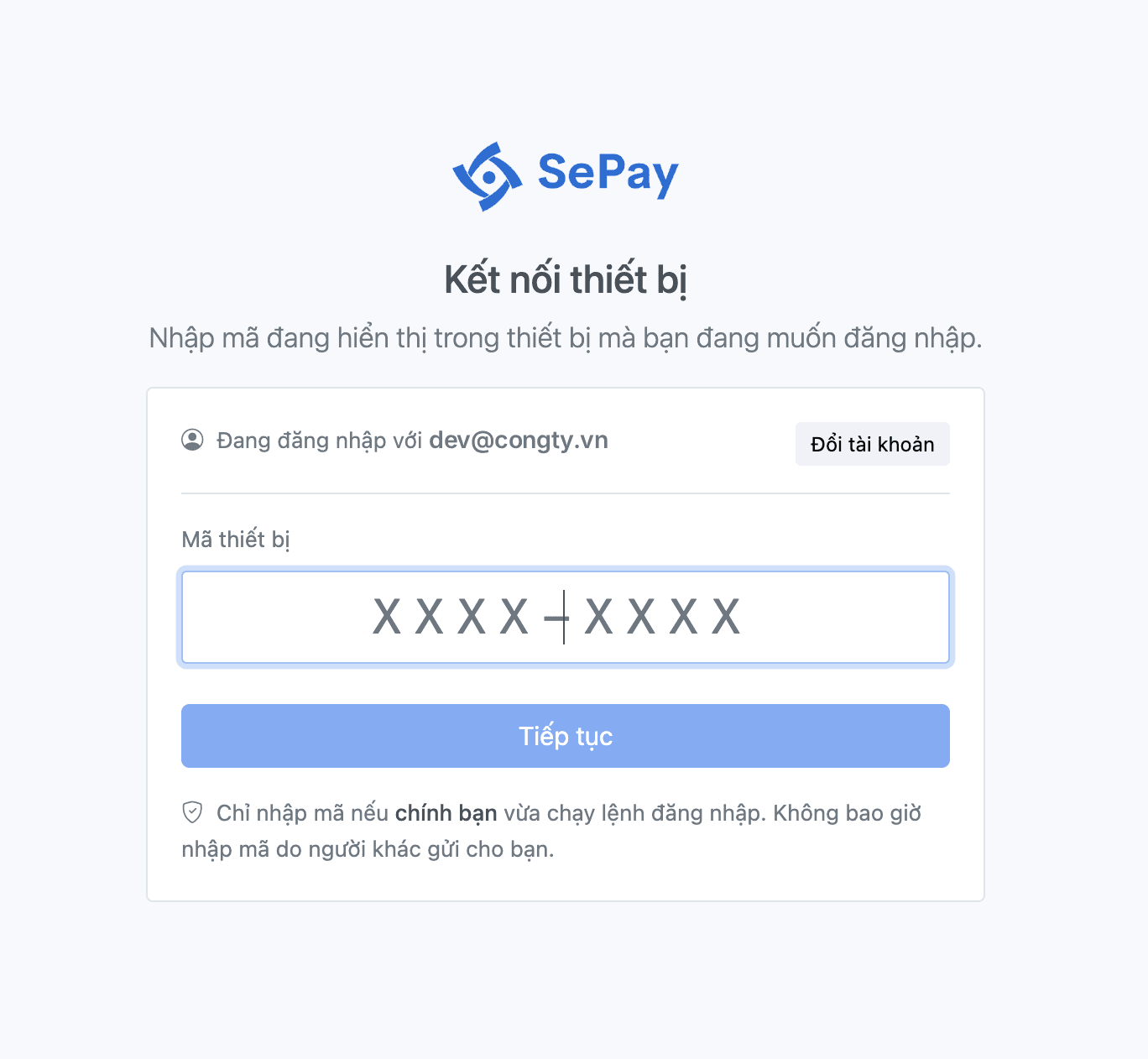
Sign-in screen language
The sign-in screen is in Vietnamese when your locale is Vietnamese: the first of LC_ALL, LC_MESSAGES, LANG that has a value starts with vi (on Windows, the display language). Any other locale shows English. Pick one outright with SEPAY_LANG=vi or SEPAY_LANG=en:
$ SEPAY_LANG=vi sepay loginMở trình duyệt để xác thực. Mã của bạn: WDJB-MJHTĐang mở https://my.sepay.vn/...c sao chép link · y sao chép mã · enter mở trình duyệt · ctrl+c huỷ⠙ đang chờ duyệt…Only the sign-in screen changes language. --help, other commands and --json or -o yaml output stay in English.
Parameters
| Flag | Type | Description |
|---|---|---|
--profile | string | Profile name (defaults to the account email; default when the email isn't returned, as is common with --with-token). |
--scopes | string | Production scopes to pre-tick on the consent screen, comma-separated. Default: every scope. |
--with-token | bool | Read a refresh token from stdin instead of opening a browser. |
--insecure-storage | bool | Store the token in a 0600 file instead of the keychain. |
Sign in on a machine without a browser
On a server or over SSH, sepay login doesn't open a browser; it prints the authentication link and a device code instead. Press c to copy the link and y to copy the code, then open the link on your own machine and enter the code. The CLI on the server picks up the session as soon as you approve.
$ sepay loginOpen your browser to authenticate. Your code: XXXX-XXXXVisit: https://my.sepay.vn/oauth/device/activatec copy link · y copy code · ctrl+c cancel⠙ waiting for approval…The copy keys write to the clipboard through the terminal (OSC 52), so over SSH the link and code land in the clipboard of the machine you're typing on. Inside tmux, turn on set -g set-clipboard on or set -g allow-passthrough on. If your terminal blocks OSC 52 the clipboard stays as it was; copy the link and code by hand.
Move a session to another machine
If you're already signed in on your own machine, move that session to the target machine instead of signing in again:
$ sepay auth token | ssh dev-server "sepay login --with-token --profile dev-server"Pipe it straight away: the value sepay auth token prints works only once and stops working when the CLI renews the session. Once the target machine has the session, the source machine may need to sign in again.
sepay auth token prints the refresh token to stdout. Don't run it where logs are kept (such as a CI build step), and don't save the output in an environment variable or secret to reuse many times.
Token storage
The token lives in your operating system's keychain. On a machine with no usable keychain (a server, a container), sepay login saves the token in hosts.yml (0600 permissions) in the configuration directory and prints a warning:
! this computer has no password store sepay can use (OS keychain), so your login was savedin a file only your user account can read: /home/user/.config/sepay/hosts.ymlnothing else to do; on a shared computer, run sepay logout when you are doneTo use the file from the start, sign in with --insecure-storage.
If a profile kept in the keychain hits a keychain that refuses the write while the CLI renews the token mid-command, the CLI doesn't switch to the file: the command still finishes and prints the renewed token is used for this run only and was not saved; your next run may ask you to sign in again.
On a shared machine, run sepay logout when you're done to remove the token.
Profiles
The CLI saves each sign-in to a profile, named after the email or after --profile. A profile holds the email, host, scopes and token. You can keep several at once, for example one for yourself and a separate one for an agent. The profile you just signed in with becomes the default for the commands that follow.
List your profiles and the state of each session:
$ sepay auth statusThe SESSION column shows whether the session is still usable: ok, expired, renews on next use, expired, run: sepay login, revoked, run: sepay login or unknown. The default profile is marked *.
Add --active to show only the default profile. sepay auth status only reads what is stored on this machine and doesn't ask SePay. So a session revoked from another machine still reads ok until a command is refused; the CLI then renews the token, or marks the profile revoked, run: sepay login when the session has been revoked.
To change the default profile for the commands that follow, run sepay auth switch <name>; leave the name out and the CLI shows a list to pick from.
$ sepay auth switch agent✓ Switched to profile agentWhen only one command needs a different profile, add --profile <name>, for example sepay transaction list --profile dev@congty.vn. The SEPAY_PROFILE environment variable does the same as --profile for every command in that shell.
Scopes
The sandbox doesn't check scopes. On production, each command needs its own scope; for example, bank-account update needs bank-account:write. The scopes are: read, webhook:write, bank-account:write, paycode:write.
sepay login without --scopes pre-ticks every production scope on the consent screen. Untick the ones you don't need, or pass --scopes to pre-tick only those. A token with no production scope works on sandbox only. --with-token without --scopes keeps the scopes of the source session.
Narrow scopes
To drop scopes without signing in again, run sepay auth refresh. For example, to give up pay code editing:
$ sepay auth refresh --remove-scopes paycode:write| Flag | Description |
|---|---|
--scopes | Scopes to keep, comma-separated; added to the current set, or replacing it with --reset-scopes. |
--remove-scopes | Scopes to drop, comma-separated. |
--reset-scopes | Ignore the current scopes and keep only those in --scopes. |
auth refresh can only narrow: it never goes beyond the scopes granted at sign-in, can't bring back a scope you dropped, and can't drop every scope. To add a scope, sign in again.
Add scopes
If a scope is missing, the command exits with exit code 5. Sign in again and grant every scope you need, including the ones you already have (sepay auth status lists them in the SCOPES column):
$ sepay login --scopes read,webhook:write,bank-account:writeSessions
Every sign-in creates a new session. List the sessions of your account:
$ sepay auth sessionsRevoke the session this machine uses and remove the stored credential:
$ sepay logoutRevoke one session by the ID sepay auth sessions lists, for example a CI machine whose token leaked:
$ sepay auth revoke --token <id>Revoke every session of your account, on every machine:
$ sepay auth revoke --allsepay auth revoke with no flag revokes the session of the profile in use. Unlike sepay logout, it keeps the profile on the machine, and sepay auth status shows revoked, run: sepay login until you sign in again.
sepay auth revoke --all and sepay logout --all affect every machine, so they ask for confirmation first. Without an interactive terminal, they exit with exit code 2 unless you pass --yes. The other commands in this section run immediately without asking.
A revoked session stops working within about 30 seconds and can't be restored; the machine that used it must sign in again.
When SePay can't be reached to revoke the session, sepay logout keeps the stored credential and exits with a non-zero code, so you can run it again later. sepay logout --local removes it from this machine only, without calling SePay; the session stays usable until it expires or is revoked with sepay auth revoke --all from another machine.
CLI token vs. API token
The token from sepay login only works with the CLI, is limited to the scopes you granted, and is short-lived, but you don't have to sign in again every time it expires. An API token created on my.sepay.vn has full access to your company and stays valid until it's revoked. Neither can stand in for the other.