Pick the install method for the tool you use: chat apps such as ChatGPT and Claude take a downloaded file, coding agents such as Claude Code and Codex install with one command. No SePay account is needed to install. For what the skill does and does not do, see SePay Skills security.
Install SePay Skills in AI chat apps
Claude, ChatGPT, Gemini and Grok all take the same sepay.zip file. It is always the latest version from the official sepayvn/sepay-skills repository. Upload the zip as it is, don't unzip it.
Menu names below follow each app's interface as of November 2026 and may change between versions.
Install SePay Skills in Claude
- Click your profile picture at the bottom left.
- Choose Settings.
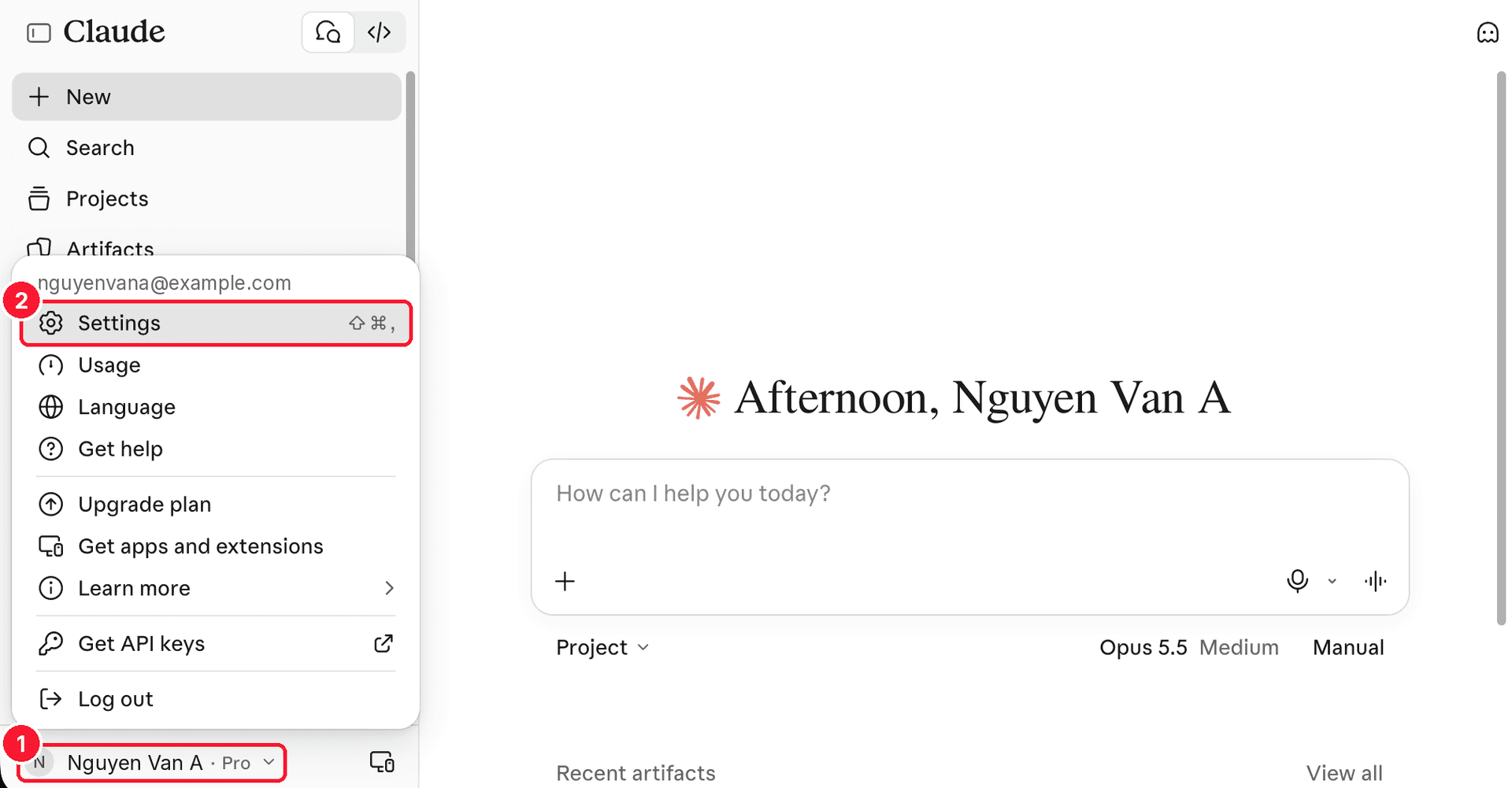
In Settings:
- In the left menu, choose Customize.
- Choose the Skills tab.
- Choose Add.
- Choose Upload skill.
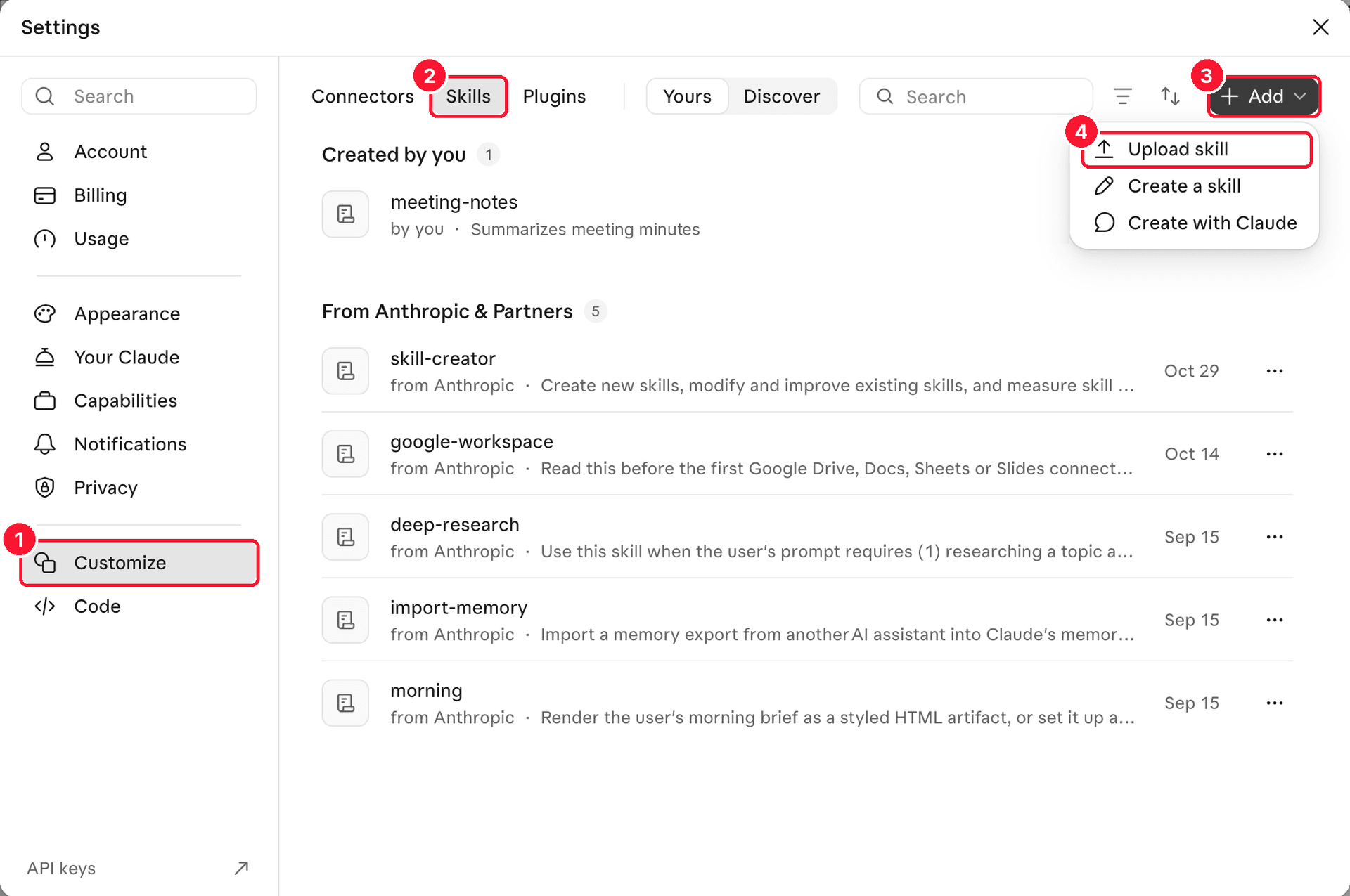
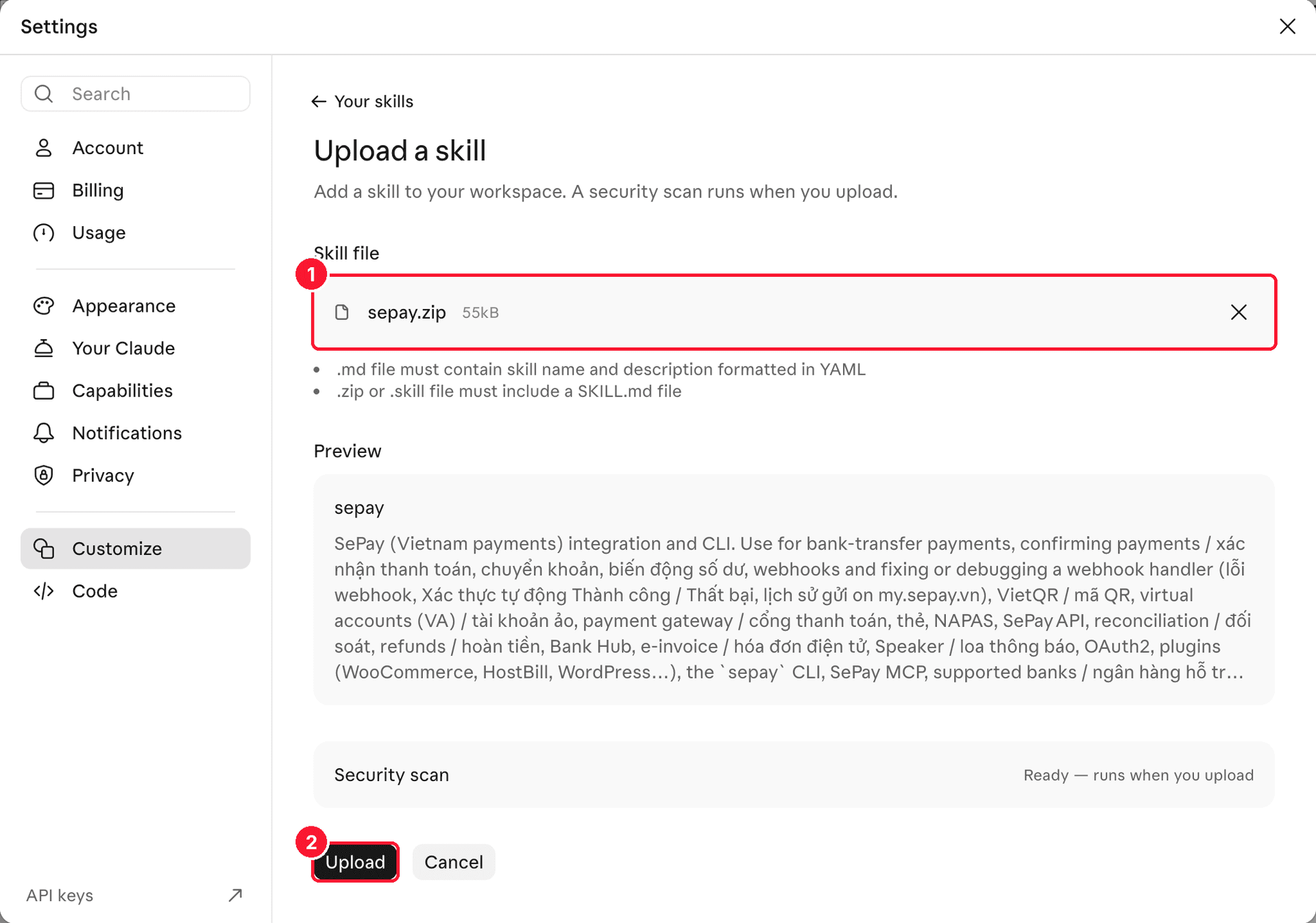
On the Upload a skill page:
- Drag and drop or browse to
sepay.zip; the file shows under Skill file. - Choose Upload. Claude turns the skill on as soon as it is uploaded.
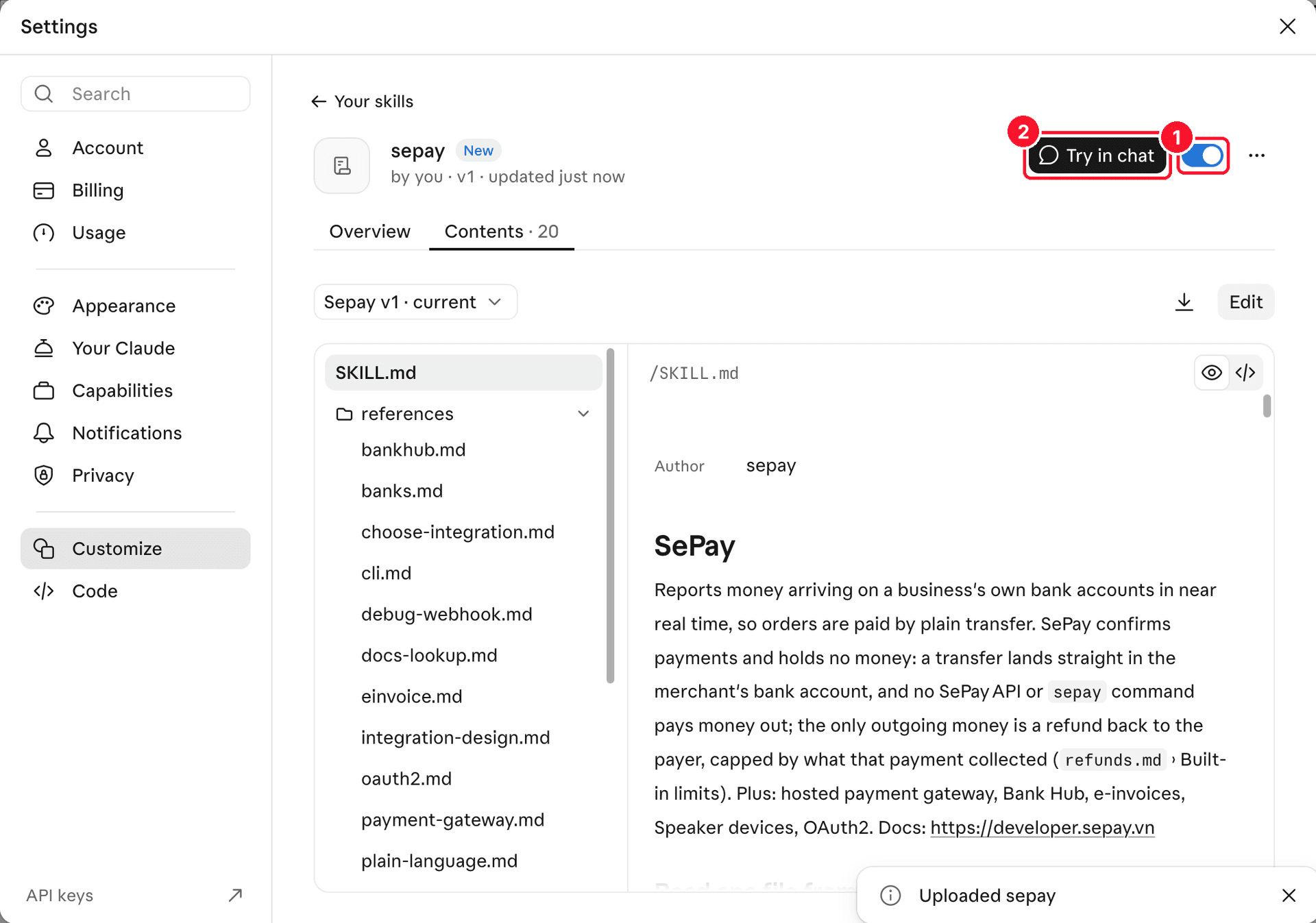
Once uploaded, Claude opens the sepay skill page:
- The switch is on, so the skill is ready to use.
- Choose Try in chat to ask a test question.
You can also open Claude's Skills page directly.
See Anthropic's guide to creating skills in ClaudeInstall SePay Skills in ChatGPT
Only ChatGPT Plus, Business, Enterprise, Healthcare and Edu plans can add skills.
In the sidebar, choose Plugins → Skills tab → Create → Upload from your computer, then pick sepay.zip.
Install SePay Skills in Gemini
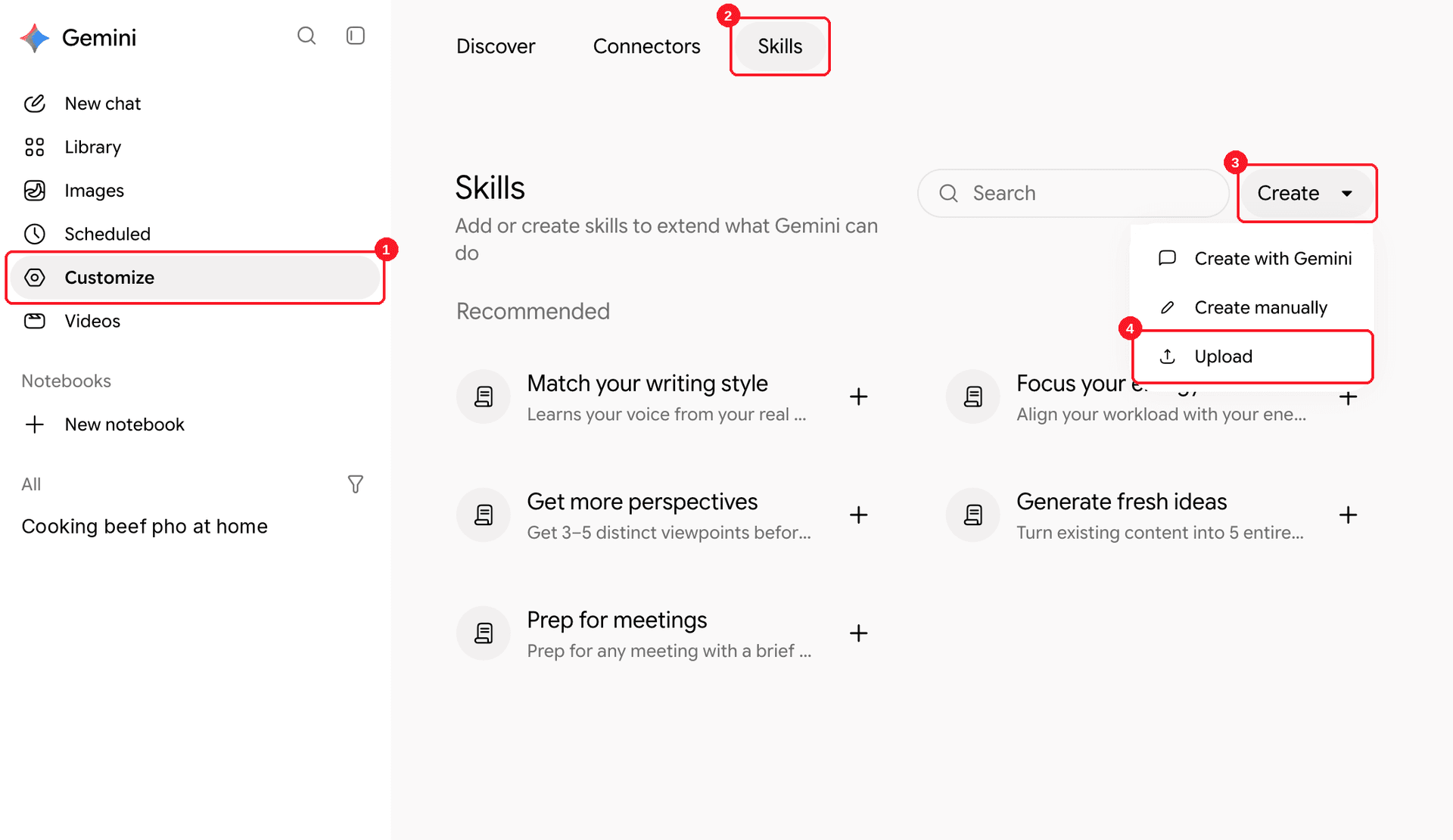
- In the sidebar, choose Customize. If you don't see it, click More first.
- Choose the Skills tab.
- Choose Create.
- Choose Upload.
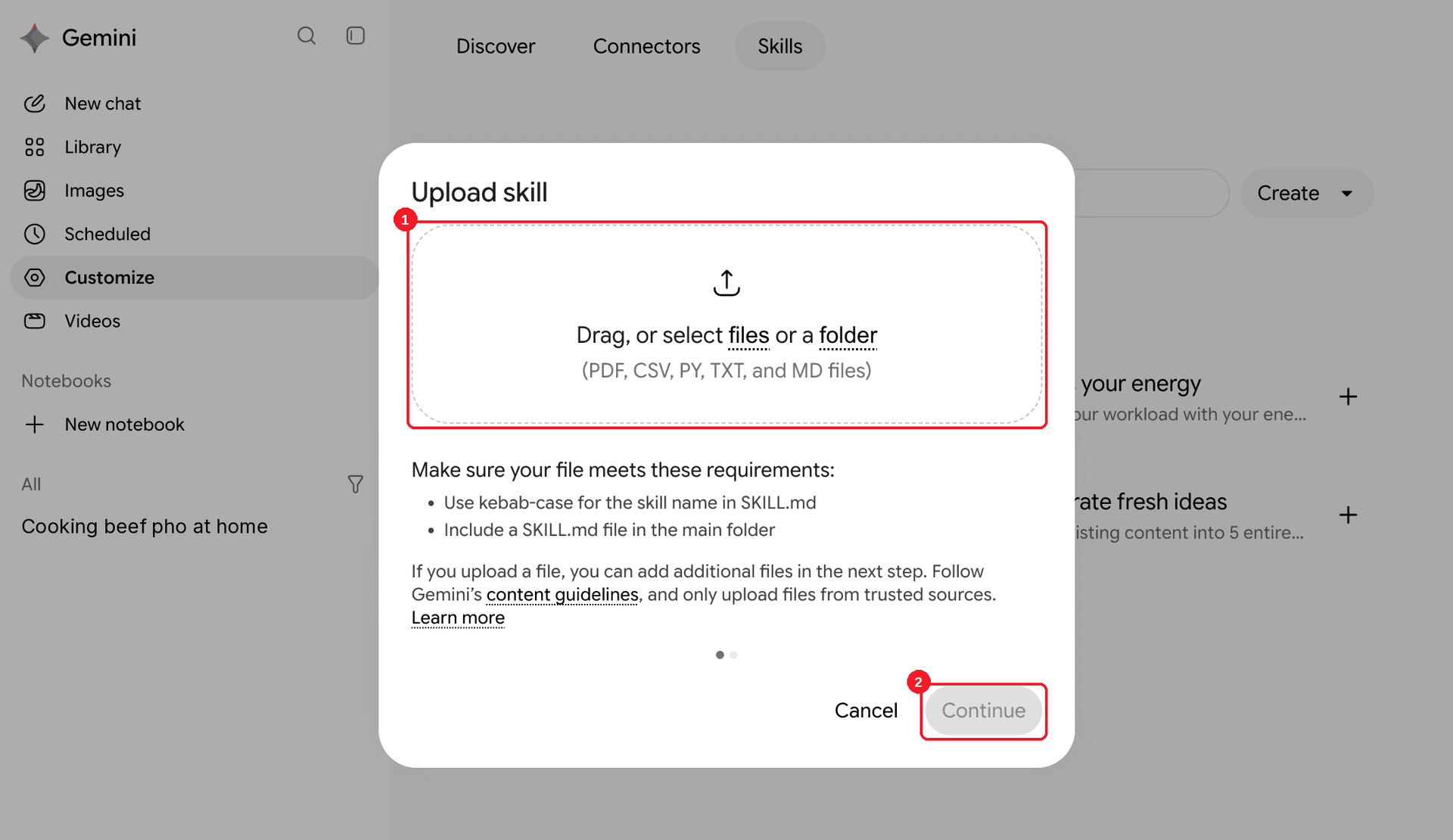
In the Upload skill dialog:
- Drag
sepay.zipinto the upload box, or click the box to pick the file. The dialog lists PDF, CSV, PY, TXT and MD files but takessepay.ziptoo. - Choose Continue.
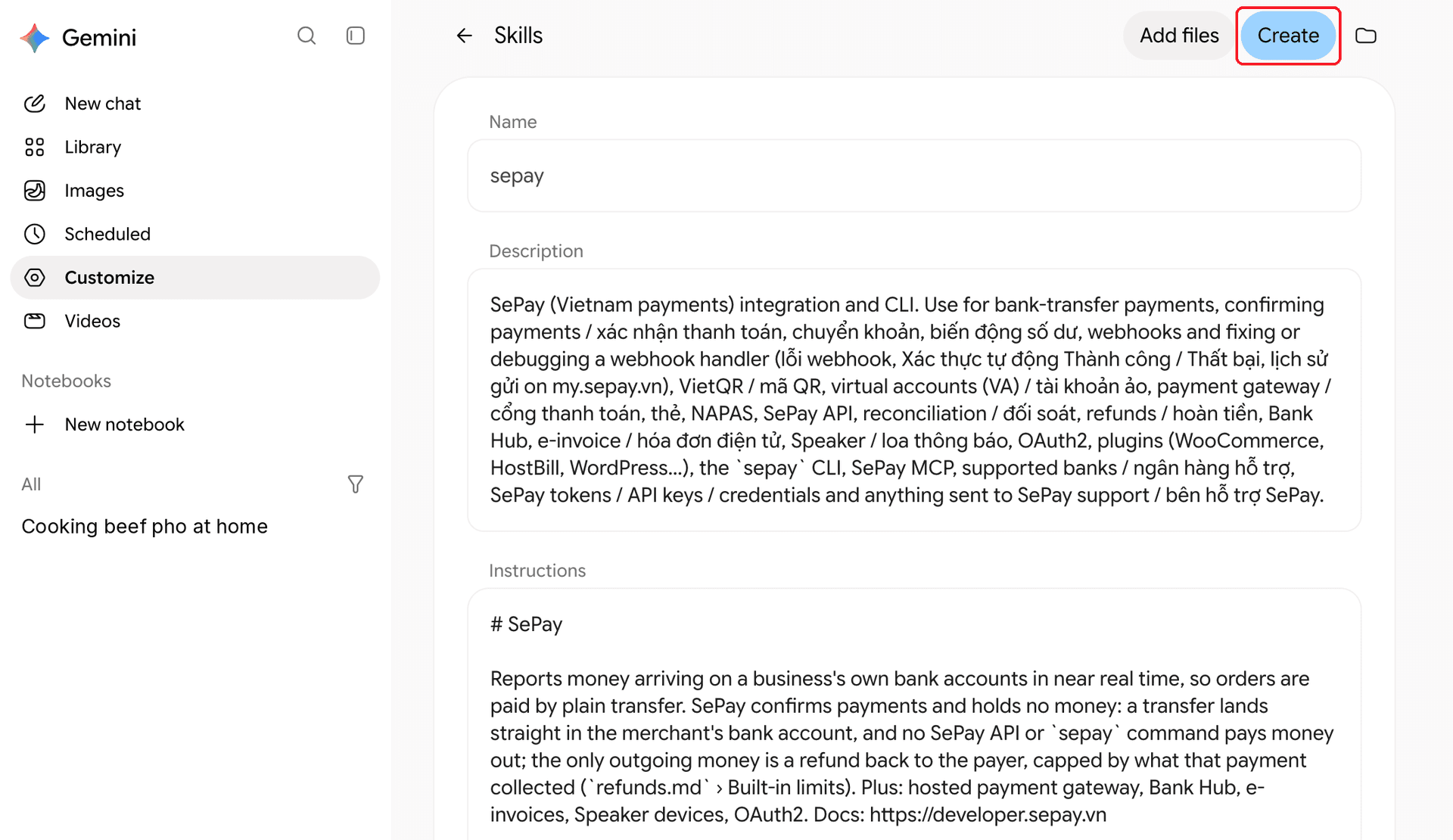
Gemini shows the sepay name, description and instructions. Choose Create to save the skill.
Install SePay Skills in Grok
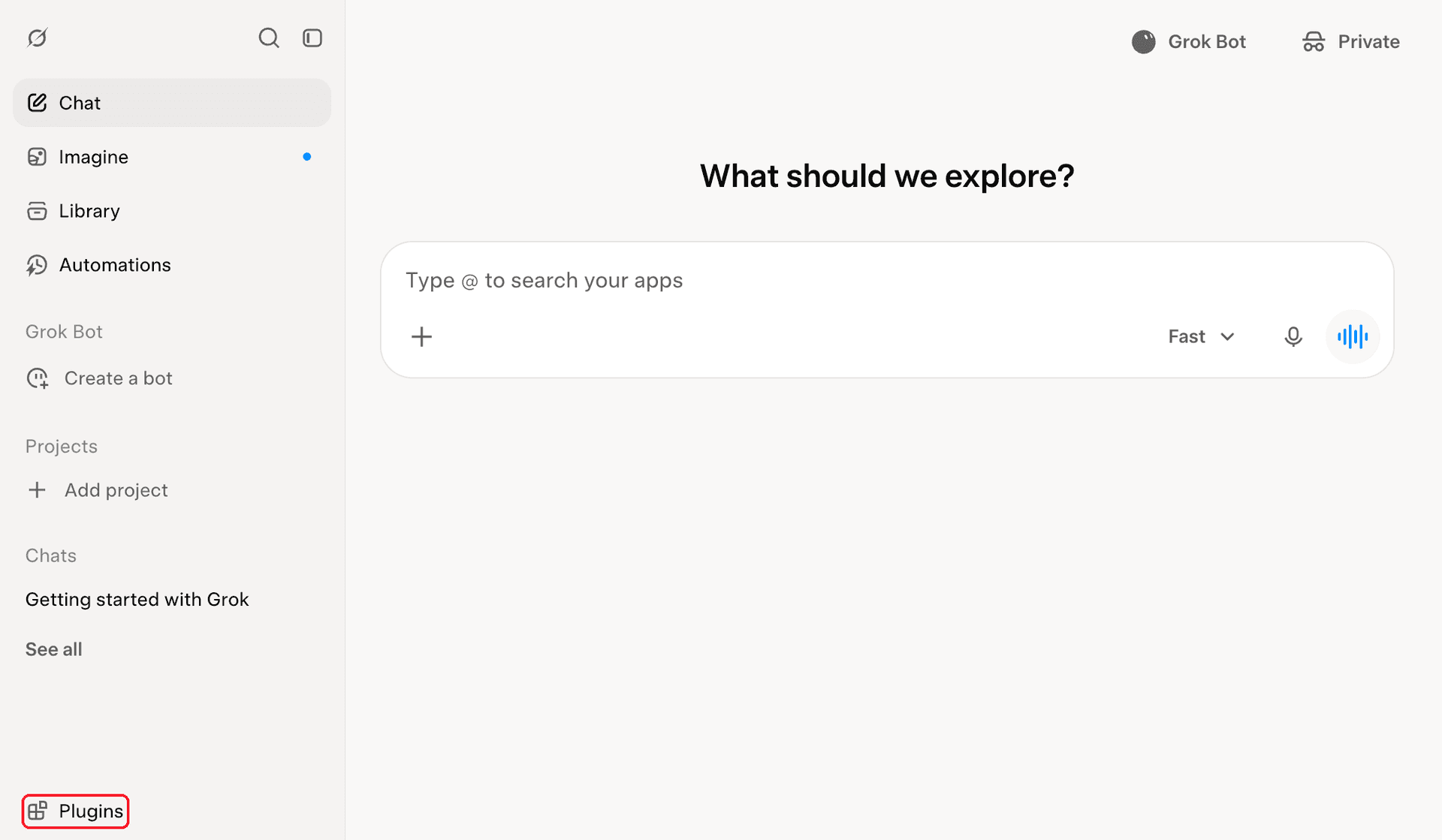
In the sidebar, choose Plugins.
In the window that opens:
- Choose the Skills tab.
- Choose New Skill.
- Choose Upload skill file.
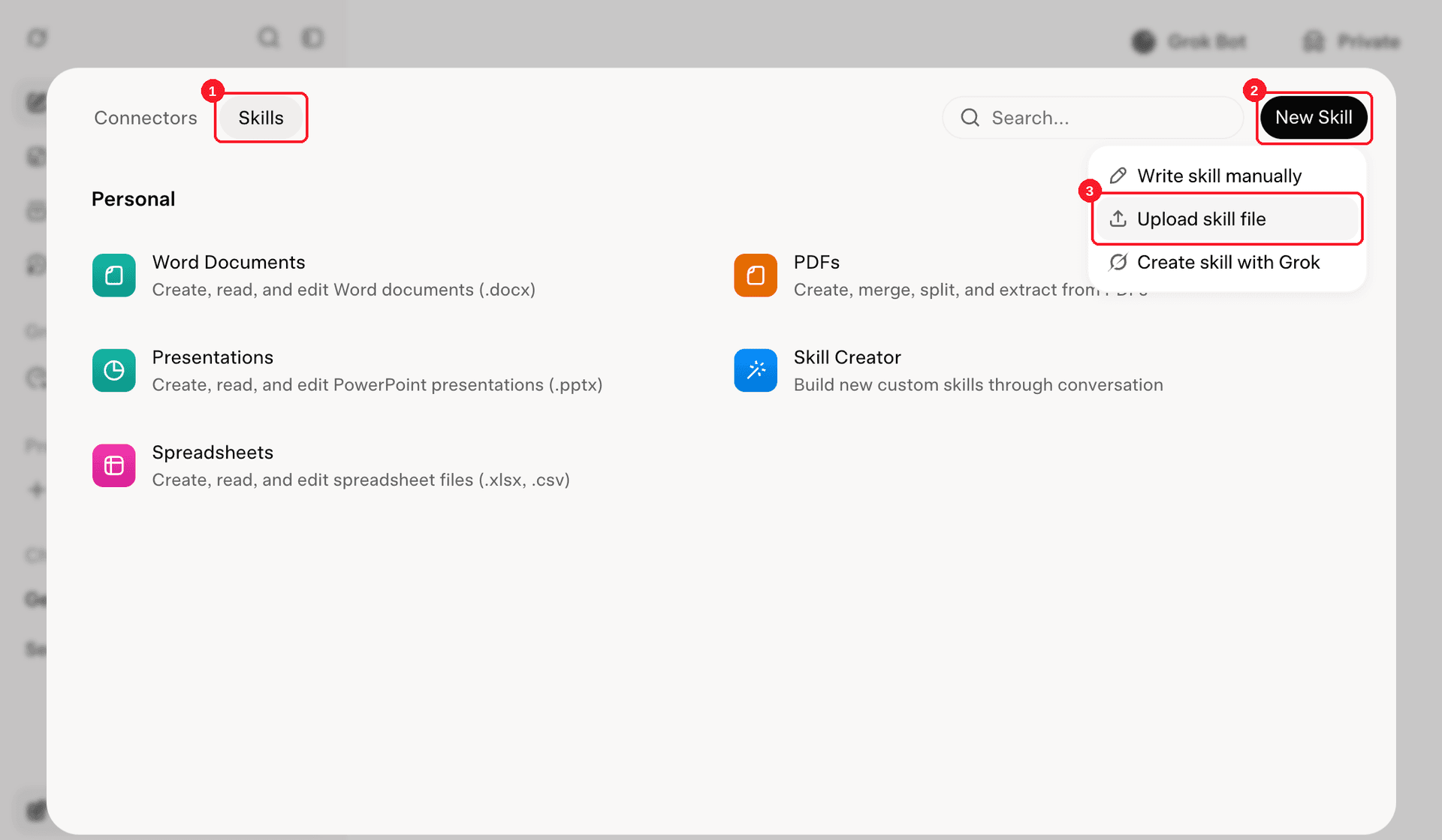
Drop sepay.zip into the Upload Skill box, or click the box to pick the file. Grok takes .zip, .skill and .md files.
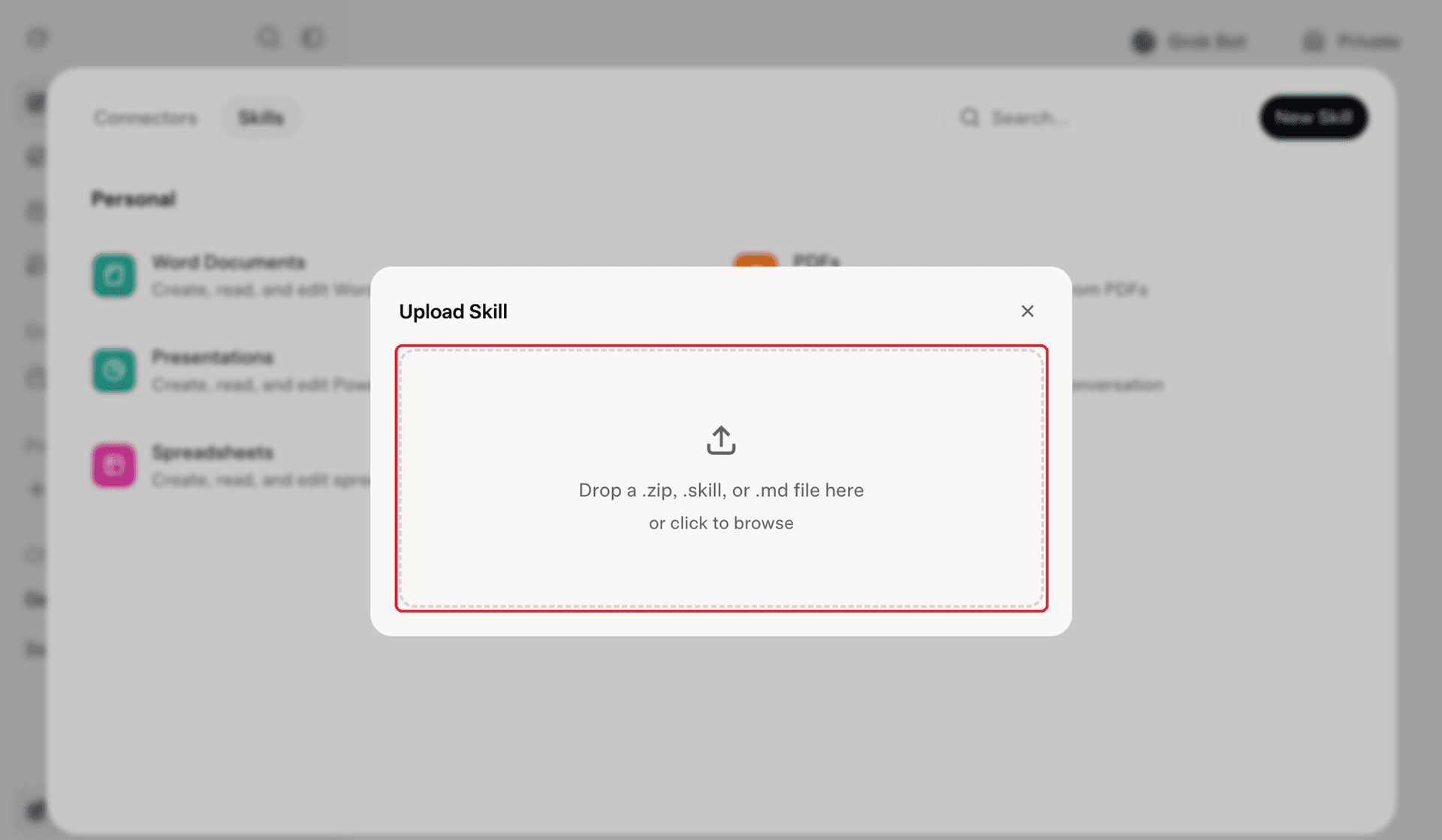
You can also open Grok's Skills page directly.
See xAI's guide to creating skills in GrokTry SePay Skills in a chat app
Start a new conversation and ask for what you need for your shop, for example:
I want to set up automatic payment verification for my online store
In Claude:
- Claude shows Loaded skill sepay when it loads the skill, then reads the skill's guide to choosing an integration.
- Claude asks which platform your store runs on: WordPress / WooCommerce uses the SePay plugin, your own code gets a webhook and QR code integration.
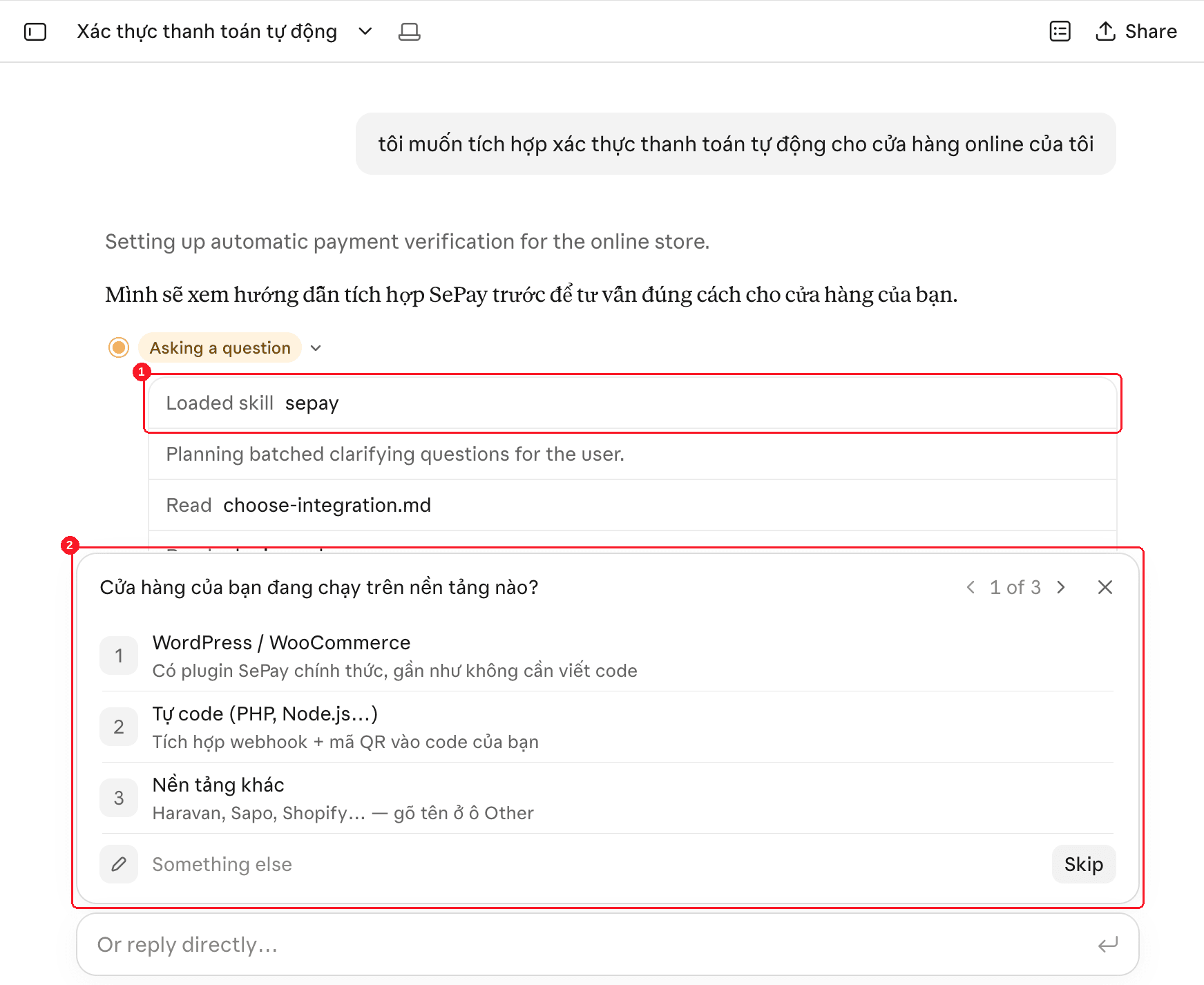
Pick the answer that fits your store and the AI walks you through my.sepay.vn using the exact button names. If the AI answers without using the skill, name SePay in the question.
Install SePay Skills for coding agents
Claude Code: install the plugin
Open Claude Code in your project root and type the command below, no Node.js needed:
 Claude Code
> /plugin install sepay --marketplace sepayvn/sepay-skillsClaude Code asks whether to add the SePay marketplace from the sepayvn/sepay-skills repo. Press y:
Claude CodeAdd marketplace? To install sepay, add the marketplace that lists it:github:sepayvn/sepay-skills Only add marketplaces you trust. You'll review the plugin and choose where to install it next. Press y to add or n to cancelThen pick where to install it with the arrow keys and press Enter:
- Install for all collaborators on this repository (project scope): installs into the project. Commit the
.claudefolder and your whole team gets it, so pick this when you work in a team. - Install for you (user scope): installs for you, in every project on your machine.
- Install for you, in this repo only (local scope): only you, only in this project.
Claude CodePlugin Details SePay Integrate SePay, Vietnam's Open Banking infrastructure: webhooks, VietQR, virtual accounts, payment gateway, SePay API, e-invoices, sepay CLI, SePay MCP. By: SePay Install for you (user scope)❯ Install for all collaborators on this repository (project scope)Install for you, in this repo only (local scope)Open homepageBack to plugin listOnce installed, Claude Code says the plugin is on and ready in the session you have open:
Claude Code> /plugin install sepay --marketplace sepayvn/sepay-skills⎿ ✓ Installed SePay. Plugin is now active.The plugin installs the skill only. For Claude Code to read transactions and balances in your SePay account, also connect SePay MCP for Claude Code.
If you installed the skill with npx into ~/.claude/skills/sepay, remove that copy first with npx skills remove sepay -g (put DISABLE_TELEMETRY=1 before it to keep it from reporting to skills.sh), so Claude Code does not have the skill twice.
Codex: install as a plugin
Run this in your terminal, no need to open Codex first or install Node.js:
$ codex plugin marketplace add sepayvn/sepay-skills$ codex plugin add sepay@sepayThe first command adds SePay's marketplace from the sepayvn/sepay-skills repo, the second installs the sepay plugin. The plugin works in every project on your machine. Start a new Codex session so Codex loads the skill.
Or type this inside Codex, it also installs the sepay skill:
 Codex
> $skill-installer install https://github.com/sepayvn/sepay-skills/tree/main/skills/sepayThis puts the skill in ~/.codex/skills/sepay. OpenAI's guide: Skills in Codex.
Cursor and other agents: install with npx
Run the command that names your agent (-a). It installs for every project on your machine (-g) and asks no questions (-y):
$ npx skills add sepayvn/sepay-skills -a cursor -g -yNode.js 22.20 or later is only needed for the npx skills command, a third-party skill installer (vercel-labs/skills), not a requirement of SePay Skills. Installing from the zip file, the Claude Code plugin or Codex's $skill-installer needs no Node.js.
The npx skills tool sends the repo name, skill name and the agents you pick to skills.sh, Vercel's skill directory, each time you install or remove; SePay Skills itself sends nothing. To turn this off, put DISABLE_TELEMETRY=1 before the command, for example DISABLE_TELEMETRY=1 npx skills add sepayvn/sepay-skills -a cursor -g -y (Windows PowerShell: run $env:DISABLE_TELEMETRY=1 first).
To keep the skill in the project so a commit shares it with your team, drop -g and run it from the project root, for example npx skills add sepayvn/sepay-skills -a cursor -y.
| Agent | -a value | Project | Global (-g) |
|---|---|---|---|
| Cursor | cursor | .agents/skills/sepay | ~/.agents/skills/sepay |
| GitHub Copilot | github-copilot | .agents/skills/sepay | ~/.agents/skills/sepay |
| Windsurf | windsurf | .windsurf/skills/sepay | ~/.codeium/windsurf/skills/sepay |
| Gemini CLI | gemini-cli | .agents/skills/sepay | ~/.agents/skills/sepay |
| Cline | cline | .agents/skills/sepay | ~/.agents/skills/sepay |
| Grok Build | grok | .grok/skills/sepay | ~/.grok/skills/sepay |
For other agents, see the agents supported by the skills CLI.
Check the skill in your agent
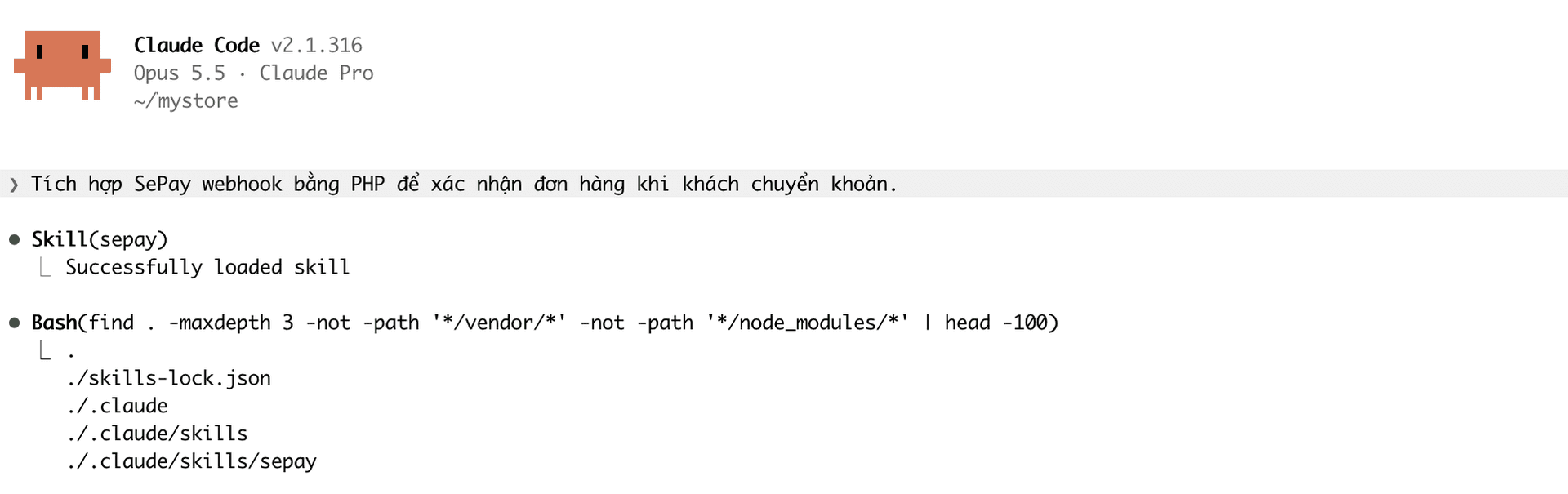
Start a new agent session, since a session that is already open does not see the new skill. Ask for SePay work, for example "Integrate SePay webhooks in PHP to confirm orders when customers pay by transfer." Claude Code shows Skill(sepay) with Successfully loaded skill when it loads the skill:
Update and remove SePay Skills
The skill does not update itself. If you installed from a file, download it again, delete the old sepay skill, then add it again. If you installed the Claude Code plugin, type:
Claude Code> /plugin update sepay@sepayIf you installed the Codex plugin, refresh the marketplace, then install the plugin again:
$ codex plugin marketplace upgrade sepay$ codex plugin remove sepay@sepay$ codex plugin add sepay@sepayIf you installed with $skill-installer in Codex, delete the ~/.codex/skills/sepay folder and run the install command again, since it stops when the folder already exists. If you installed with npx, run:
$ npx skills update sepayTo remove it, delete the sepay skill under Skills in your chat app, or delete the sepay folder in the agent's skill folder (Codex with $skill-installer: ~/.codex/skills/sepay). For the plugin, type /plugin uninstall sepay@sepay in Claude Code, or run codex plugin remove sepay@sepay for the Codex plugin. If you installed with npx, run npx skills remove sepay, adding -g for a global install. Removing also sends the repo name, skill name and agents to Vercel's skills.sh; to turn that off, run DISABLE_TELEMETRY=1 npx skills remove sepay.
Common issues
Next
- See what the AI can do with the skill in the SePay Skills overview.
- Let the AI read account data while debugging with SePay MCP.