API Access in Test mode lets you create an API token that is separate from your Live token, never shared with Live. Tokens are created and managed inside Test mode and only authenticate against the userapi-sandbox.sepay.vn endpoint.
Live tokens won't authenticate against userapi-sandbox.sepay.vn, and Test mode tokens won't call the Live userapi.sepay.vn endpoint. Each environment maintains its own token registry.
Open the API Access page in Test mode
Go to Test mode → API Access.
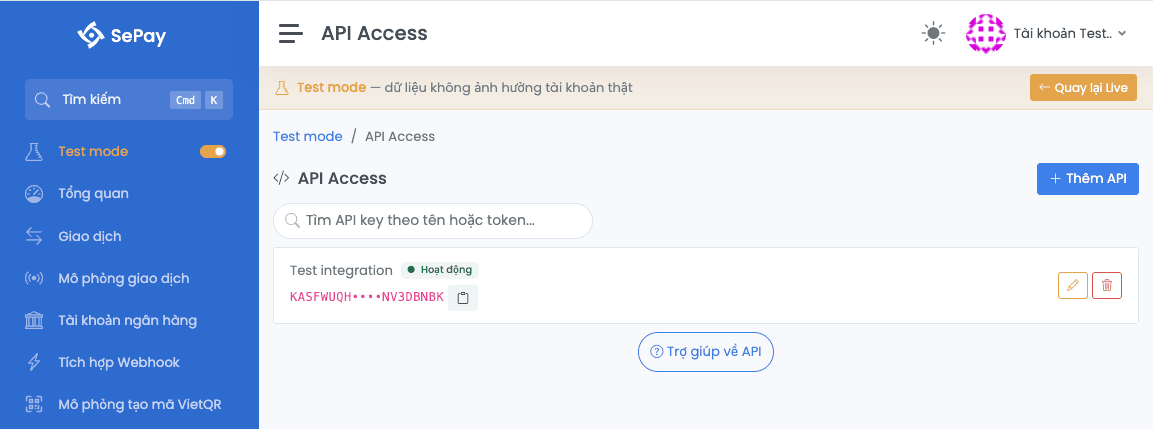
Create an API Access token
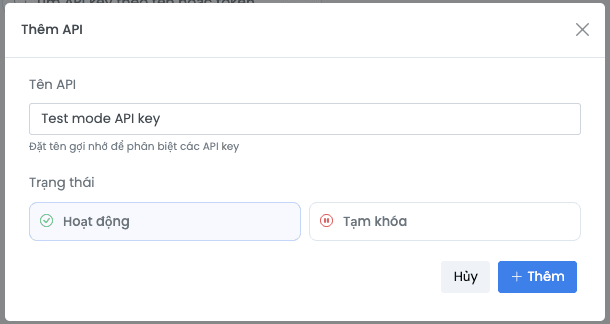
Click + Add API in the top-right corner, fill in the fields, and click Add.
| Field | Description |
|---|---|
| Name | A memorable name, e.g. Test integration |
| Status | Active |
Once the token is created, copy the API Token value from the API Access list into your server's environment variable. The token is shown in full only once.
Test the connection
With the token in hand, hit a Test mode endpoint to confirm it works:
curl -X GET "https://userapi-sandbox.sepay.vn/v2/bank-accounts" \-H "Authorization: Bearer YOUR_SANDBOX_API_TOKEN"
The response returns the list of accounts created in Test mode (same JSON envelope format as Live).
Manage tokens
On the API Access page in Test mode, each token supports the following actions:
| Action | Effect |
|---|---|
| Toggle on/off | Temporarily disable or re-enable the token without deleting it |
| Rename | Change the display name; does not affect the token value |
| Delete | Permanently invalidate the token; cannot be restored |
Differences vs Live
The creation and management flow is identical to Live (same fields, same actions). Differences:
| Aspect | Live | Test mode |
|---|---|---|
| Auth endpoint | userapi.sepay.vn | userapi-sandbox.sepay.vn |
| Data scope | Real accounts and transactions | Test mode accounts and simulated transactions |
| Token quota | Unlimited | Up to 50 |
| Creation flow | Create API Token | Same flow, performed inside Test mode's API Access |
Next
- SePay API v2 quickstart
- Quotas: up to 50 API Access entries per company