The payment code structure in Test mode (chế độ thử nghiệm) controls how SePay extracts the code field from transfer content. Each template defines a prefix (e.g. DH) and a suffix length range (e.g. 3-10 chars). When you simulate a transaction, SePay scans the content against active templates and attaches the match to the webhook payload.
- Toggle payment code recognition on/off globally
- Each company account can define multiple templates; the first one is the default and cannot be deleted
- Each template has: prefix, min/max suffix length, character type, status
- Applies to Simulate transaction and webhook filters
Open the Test mode Configuration page
Go to Test mode → Cấu hình (Configuration).
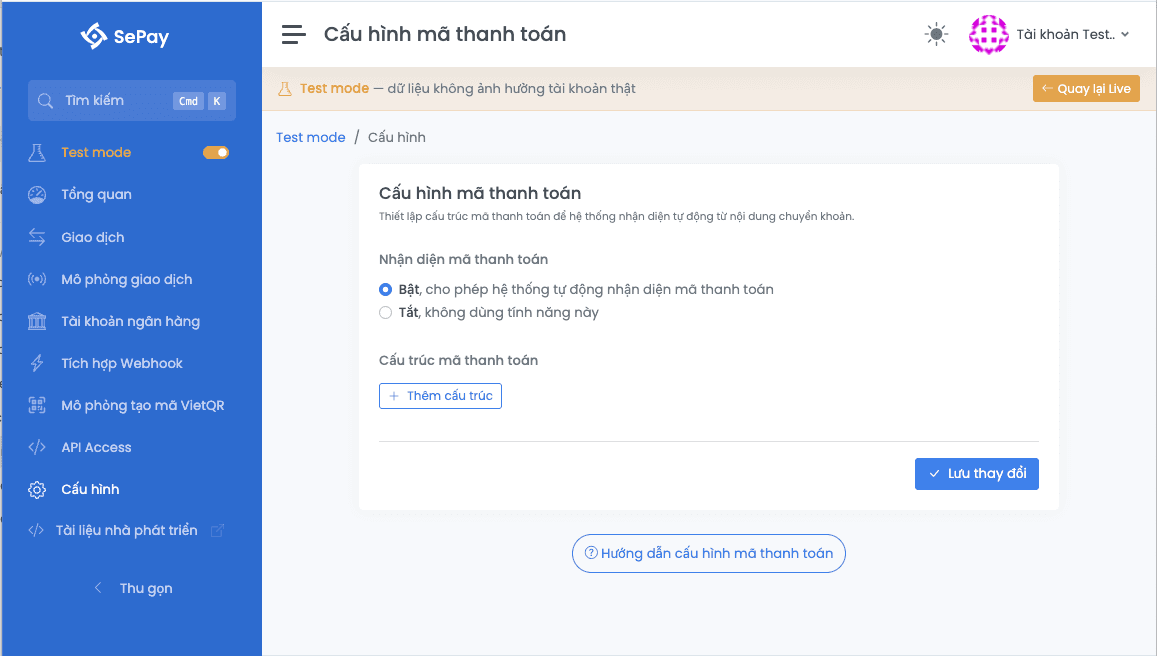
Enable payment code recognition
The Nhận diện mã thanh toán (Payment code recognition) section at the top has two states:
| State | Effect |
|---|---|
| Bật (On, default) | SePay scans the transfer content against active templates; the code field is filled when a match is found |
| Tắt (Off) | SePay skips scanning; the code field is always empty even if the content contains a valid code |
The webhook filter Chỉ gửi khi có mã thanh toán (Only send when code present) only takes effect when this toggle is On.
Fields in each template
Each template is a card with 4 fields plus a status switch:
| Field | Required | Description |
|---|---|---|
| Prefix (Tiền tố) | Yes | Beginning of the code (e.g. DH, HD, ORDER). Up to 10 characters. The system uppercases automatically on save. |
| Min suffix length | Yes | Minimum characters after the prefix. Range 1-30. Default 3. |
| Max suffix length | Yes | Maximum characters after the prefix. Range 1-30, must be ≥ min value. Default 10. |
| Character type | Yes | Số nguyên (digits only, 0-9) or Số và chữ (alphanumeric, digits and letters A-Z). |
| Status | No | Switch Đang hoạt động (Active) / Ngưng hoạt động (Inactive). Only active templates participate in matching. |
The Ví dụ (Example) line in each card auto-updates based on the current values (e.g. prefix DH + 3-char digit suffix shows DH111).
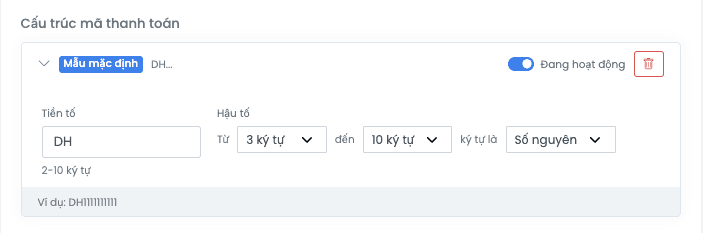
Add, edit, remove templates
| Action | How |
|---|---|
| Add template | Click + Thêm cấu trúc (Add structure) at the end of the list. The new card opens expanded. |
| Edit template | Expand the card, change fields, click Lưu cấu hình (Save) at the bottom of the page. |
| Delete template | Click the trash icon on the card. The first template (Cấu trúc mặc định / Default structure badge) cannot be deleted, you can only deactivate it. |
| Pause template | Turn the Đang hoạt động switch off, then Lưu cấu hình. The template stays but is excluded from matching. |
After editing, click Lưu cấu hình at the bottom. A "Lưu cấu hình thành công" (Saved successfully) toast appears on success.
How SePay extracts the code from content
When you simulate a transaction (or when a real transaction lands on Live), the system scans the transfer content against active templates in declaration order:
- Take the first active template.
- Search the content for a string matching
<prefix><N characters of the chosen type>where N is between min and max suffix length. The prefix match is case-insensitive. - On match, attach the matched string to the webhook payload's
codefield and stop. - On no match, try the next template. If no template matches,
codestays empty.
| Template | Transfer content | Extracted code |
|---|---|---|
Prefix DH, suffix 3-10, Digits only | DH123456 thanh toan don hang | DH123456 |
Prefix DH, suffix 3-10, Digits only | dh999 thanh toan | DH999 |
Prefix DH, suffix 3-10, Digits only | Chuyen tien sinh hoat | (empty) |
Prefix HD, suffix 4-6, Alphanumeric | HD12AB chuyen khoan | HD12AB |
Differences vs Live
| Aspect | Live | Test mode |
|---|---|---|
| Location | Cấu hình Công ty → Cấu hình chung → Cấu trúc mã thanh toán | Test mode → Cấu hình |
| Max prefix length | 5 characters | 10 characters |
| Matching behavior | Applied to real bank transactions | Applied to simulated transactions in Test mode |
| Template count | Unlimited | Unlimited |
Live and Test mode configurations are isolated: changes in Test mode never affect Live and vice versa.
Next
- Simulate transaction: verify the recognized payment code in the webhook payload
- Create webhook: enable the Chỉ gửi khi có mã thanh toán filter so the webhook skips transactions without a code
- Live payment code configuration: the same configuration for Live