Simulating a transaction in Test mode creates a mock transaction record on the selected bank account, updates the accumulated balance when applicable, then queues webhooks exactly as a real incoming transfer would. Use it to verify webhook logic, payment code parsing and VA filtering without real money movement.
Simulate transaction is only enabled in Test mode (chế độ thử nghiệm). Switch to Test mode in the my.sepay.vn sidebar to access it. The button is not available in Live.
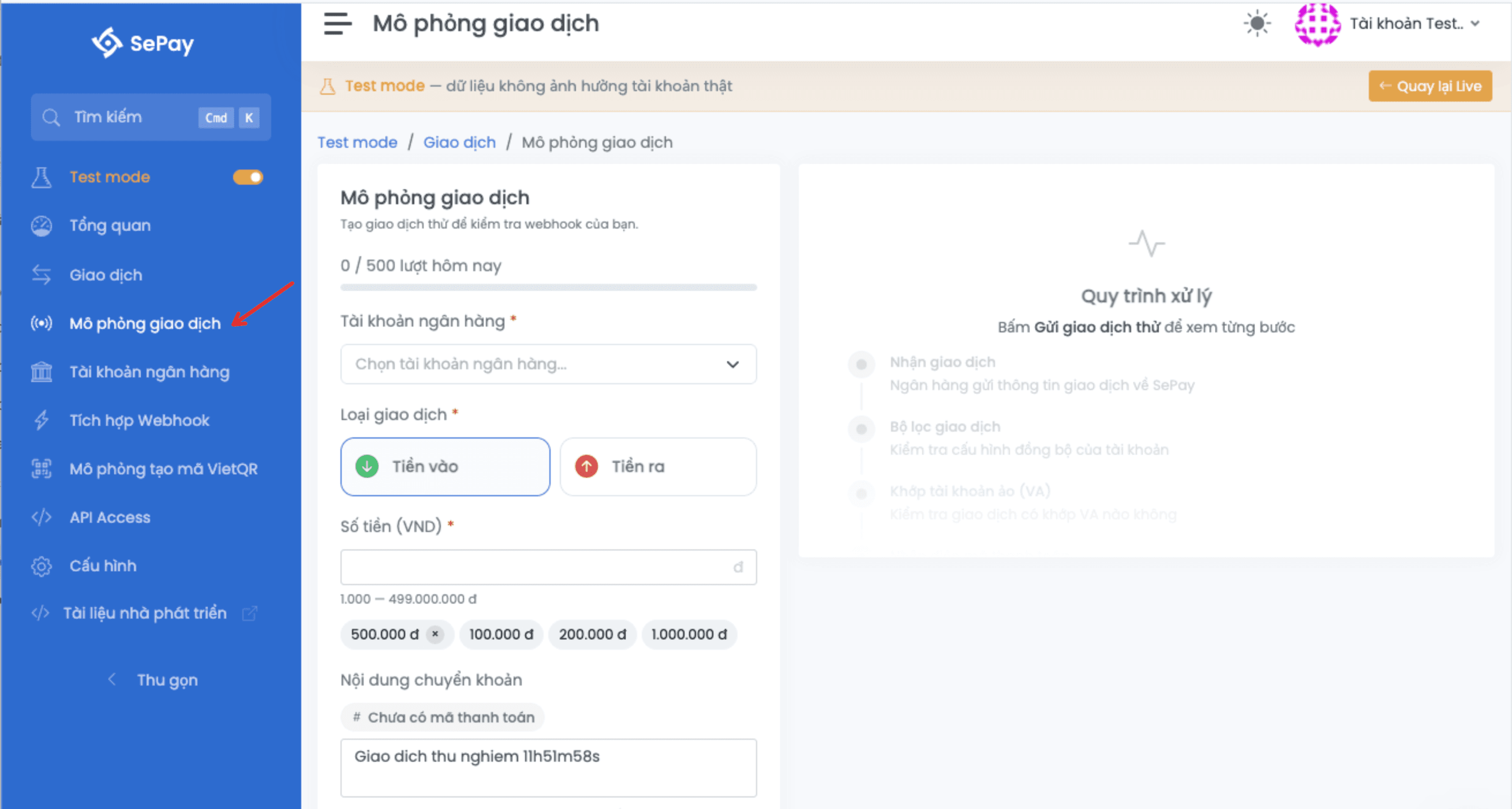
Open the Test mode simulator
- In the Test mode sidebar, click Mô phỏng giao dịch (Simulate transaction).
- The simulator opens; pick an account and fill in the fields.
Form fields
| Field | Required | Description |
|---|---|---|
| Bank account | Yes | Pick from the accounts you have created in Test mode. If the account was replicated from Live, the form shows a notice that the simulation does not affect the original Live account. |
| Virtual account (VA) | Conditional | Appears after you pick an account. Required for OCB, KienLongBank, MSB and BIDV (individual, business household); optional for the rest. |
| Transfer type | Yes | Tiền vào (in, default) or Tiền ra (out). Determines which webhooks match based on the Loại giao dịch setting (Có tiền vào / Có tiền ra). |
| Amount | Yes | VND, minimum 1,000, maximum 499,000,000. |
| Transfer content | No | Up to 200 characters. Auto-generated as a Giao dich sandbox string with the current timestamp if blank. As you type, the form detects payment codes and memo-based VA codes and shows them as chips above the field. |
| Reference number | (auto) | The system generates a reference string starting with SB. You don't fill this in. |
| Transaction time | (auto) | The current time in Vietnam (UTC+7). |
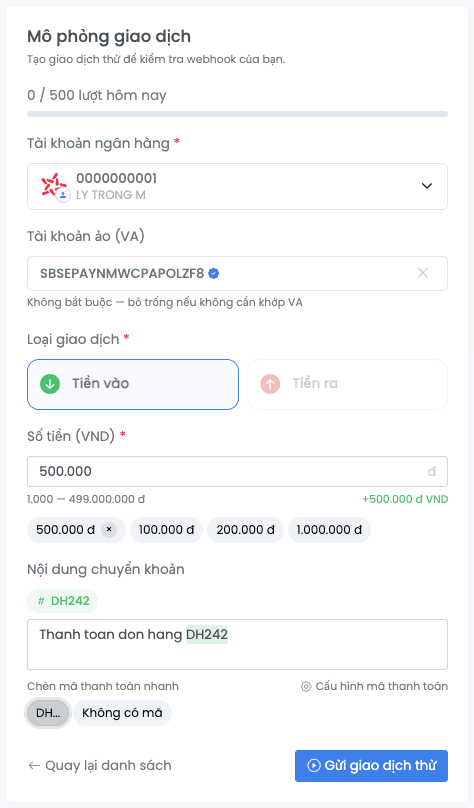
If you use a payment code prefix (for example DH, HD), configure it at Company → General settings → Payment code structure. The simulate form uses this configuration to detect codes inside the transfer content in real time.
Processing pipeline
After you click Send simulated transaction, SePay runs the following four steps and reports the result inline:
- Receive transaction (Nhận giao dịch): check the daily quota and write the transaction record onto the selected bank account.
- Filter check (Bộ lọc giao dịch): each enabled webhook runs through its configured filters (Loại giao dịch, Chỉ gửi khi có mã thanh toán, Tiền tố mã thanh toán). Webhooks that pass are queued for delivery; webhooks that don't are logged with a skip reason.
- Match VA (Khớp tài khoản ảo): if the content or VA field matches an active VA, attach its code to the payload's
subAccountfield. No match leaves it empty. - Detect payment code (Nhận diện mã thanh toán): parse the transfer content against the configured prefixes and set the payload's
codefield. No match leaves it empty.
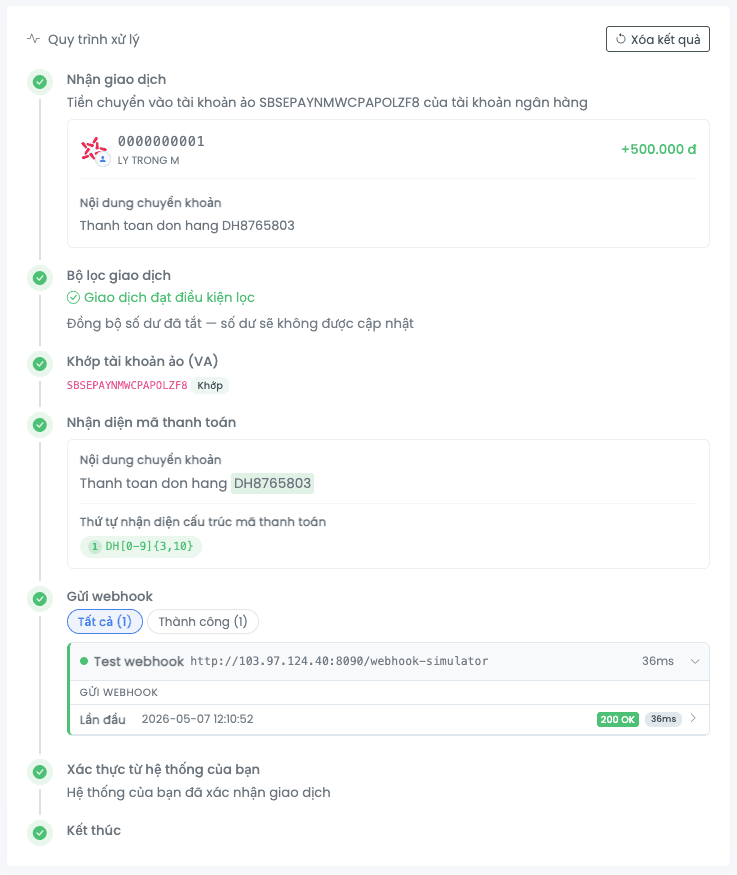
Simulation result
After processing, the form lists every evaluated webhook with:
- Status:
Send(queued for delivery) orSkipped(blocked by a filter). - Skip reason when applicable:
| Reason shown | When it triggers |
|---|---|
| Loại giao dịch không phù hợp với cấu hình webhook | Webhook listens for Có tiền vào only but the transaction is outgoing (or vice versa). |
| Nội dung không chứa mã thanh toán | Webhook has Chỉ gửi khi có mã thanh toán enabled but the transaction has no detected code. |
| Mã thanh toán không khớp tiền tố cho phép | Webhook restricts to a Tiền tố mã thanh toán list but the detected code doesn't start with any of those prefixes. |
Queued webhooks are delivered asynchronously. Each delivery's HTTP status, response body and round-trip time appears in the transaction detail page once the list refreshes.
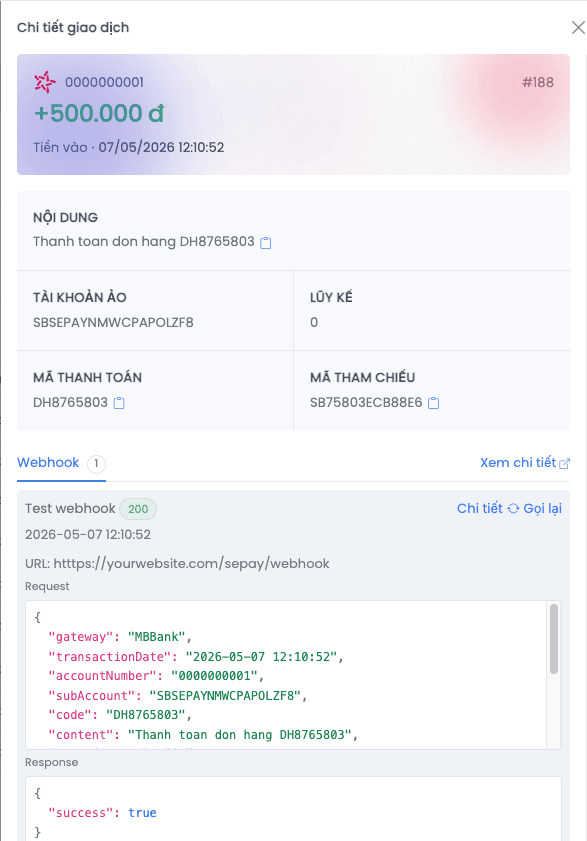
In the transaction detail page, every webhook log row has a Replay button to resend the payload while bypassing the filters. Useful when you've just fixed an endpoint and don't want to create another transaction. Replay is rate-limited to 10/min/company.
Webhook payload
Each matched webhook receives a JSON POST with the same shape as Live:
{
  "gateway": "MBBank",
  "transactionDate": "2026-01-15 10:30:00",
  "accountNumber": "0123456789",
  "subAccount": "SBSEPAYX9KA2B7MN4QR",
  "code": "DH123456",
  "content": "DH123456 thanh toan don hang",
  "transferType": "in",
  "description": "NGUYEN VAN A chuyen tien",
  "transferAmount": 100000,
  "referenceCode": "SB1A2B3C4D5E",
  "accumulated": 5000000,
  "id": 12345
}| Field | Description |
|---|---|
gateway | Bank name of the simulated account |
transactionDate | Transaction time (UTC+7) |
accountNumber | Bank account number |
subAccount | VA code when matched; empty when no VA was used |
code | Detected payment code; empty if no prefix matched |
content | Transfer content (your input or auto-generated) |
transferType | in for incoming, out for outgoing |
transferAmount | Amount (VND), always positive |
referenceCode | Auto-generated reference, starting with SB |
accumulated | Accumulated balance after the transaction (see below) |
id | SePay transaction ID |
Accumulated balance
accumulated only changes when the simulated account uses a connection that tracks balance:
| Connection | Updates accumulated? |
|---|---|
| SMS | Yes |
| API VietinBank individual, business household | Yes |
| API TPBank | Yes |
| Other API connections | No (keeps the value from the account) |
When updated:
- Incoming: new
accumulated= oldaccumulated+transferAmount - Outgoing: new
accumulated= max(0, oldaccumulated−transferAmount)
Filter webhooks by VA
When the transaction is attached to a VA, only webhooks with Chỉ nhận thông báo từ các giao dịch của tài khoản ảo (VA) enabled match. This is the quickest way to test VA logic: create a VA, simulate a transaction targeting that VA, and confirm the webhook only fires for transactions tied to a VA.
Daily simulation quota
Each company can simulate up to 500 transactions per day. The quota resets at 00:00 Vietnam time (UTC+7). The form shows a Used: X/500 bar at the top of the modal and disables the send button when the quota is exhausted.
Deleting a simulated transaction returns its quota slot for that day.
Next
- Create VA: create a VA first, then simulate against it to test
subAccountlogic - Webhooks in Test mode: configure a webhook to receive simulated transactions
- Quotas: other Test mode limits