Test mode is an isolated environment in the my.sepay.vn Dashboard, separate from Live and built for developers and integration teams. Every resource you create inside Test mode (bank accounts, VAs, webhooks, API Access, transactions) is fully isolated: no simulated transaction touches real money, and no Live webhook receives Test mode payloads. Use it for integration testing, CI/CD runs, or onboarding ops people without risking production data.
Enable Test mode
On my.sepay.vn, open Test mode in the sidebar (the test-tube icon) and toggle it on. Or open search (Cmd K / Ctrl K), type "Test mode", and pick the result.
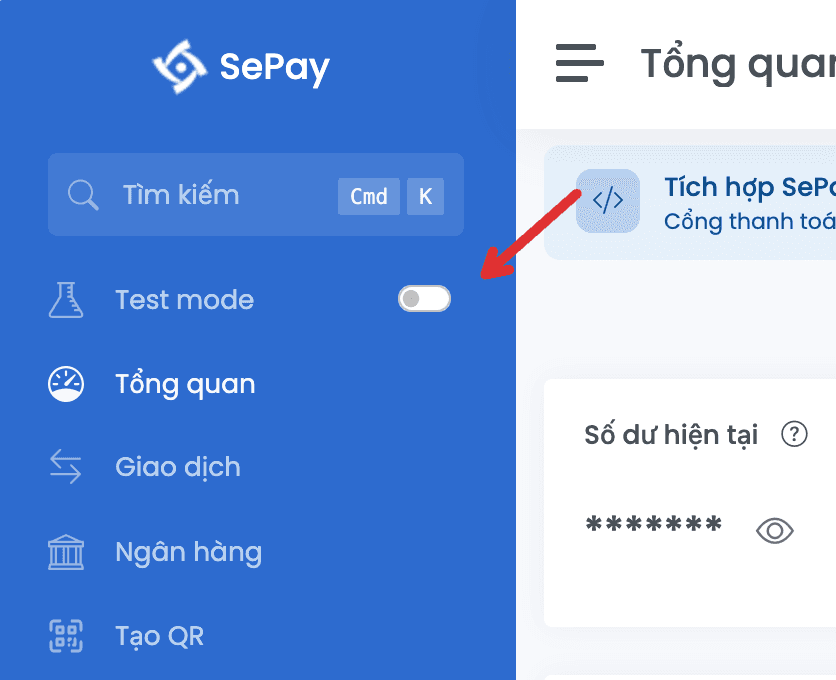
Once you're in Test mode, a yellow banner "Test mode: data does not affect Live accounts" appears at the top of the page. To return to Live, click ← Back to Live on the banner or toggle the sidebar switch off.

Test mode access permission
Access to Test mode is controlled by the user's role within the company account:
| Role | Test mode access |
|---|---|
| SuperAdmin | Granted by default |
| Admin | Granted by default |
| Người dùng (User) | Needs the Cho phép truy cập Test mode (chế độ thử nghiệm) permission |
A SuperAdmin or Admin grants the permission at Cấu hình Công ty → Người dùng → open the user detail → enable Cho phép truy cập Test mode (chế độ thử nghiệm).
Without the permission, the Test mode sidebar toggle is hidden or returns an access-denied message. Ask a SuperAdmin or Admin on your company account to grant it.
Resources you configure in Test mode
| Resource | Description | Page |
|---|---|---|
| Bank account | Create from scratch or replicate from Live, used as the source for simulated transactions | Bank account |
| Virtual account (VA) | Simulated official VAs with the SBSEPAY bank prefix, or memo-based VAs with a random 3-character code | Create VA |
| API Access | Create and manage API tokens scoped to Test mode, only authenticate on userapi-sandbox.sepay.vn | API Access |
| Webhook | Endpoint that receives simulated transactions, sharing all 5 auth types and filters with Live | Create webhook |
| Simulated transaction | The Simulate Transaction form in Dashboard, produces Live-shaped payloads | Simulate transaction |
Test mode quotas
Each company has its own quota for every Test mode resource type (bank accounts, VAs per account, webhooks, API Access, simulated transactions per day). Hitting a quota rejects the operation; delete an old resource to free up room.
Full quota table and what to do when you hit a limit: Test mode quotas.
Per-product Test mode integration
| Product | Test mode page |
|---|---|
| SePay Webhooks | Quick Start: enable, create an account, create a webhook, simulate the first transaction |
| SePay API v2 | Quick Start: Test mode section in the API v2 quickstart (enable Test mode, create a token, use the Production/Sandbox toggle) |
Everything you do in Test mode (creating accounts, webhooks, transactions) is isolated from real data. No simulated transaction ever affects a Live bank account or Live balance.