Generating a VietQR in Test mode (chế độ thử nghiệm) produces a QR code from a Test mode bank account or VA, with a built-in scan-and-confirm simulation right in the UI. Use it to verify how the QR renders on your payment page before going to Live.
- The QR is built from a bank account and VA in Test mode (unrelated to your Live account)
- Three display templates: Thu gọn (Compact), Chỉ QR (QR only), Đầy đủ (Full)
- A Mô phỏng chuyển khoản (Simulate transfer) button mocks a customer scanning the QR and confirming
- The page returns the QR image (PNG), the QR URL and integration snippets for several languages
Open the Simulate VietQR page
Go to Test mode → Mô phỏng tạo mã VietQR (Simulate VietQR).
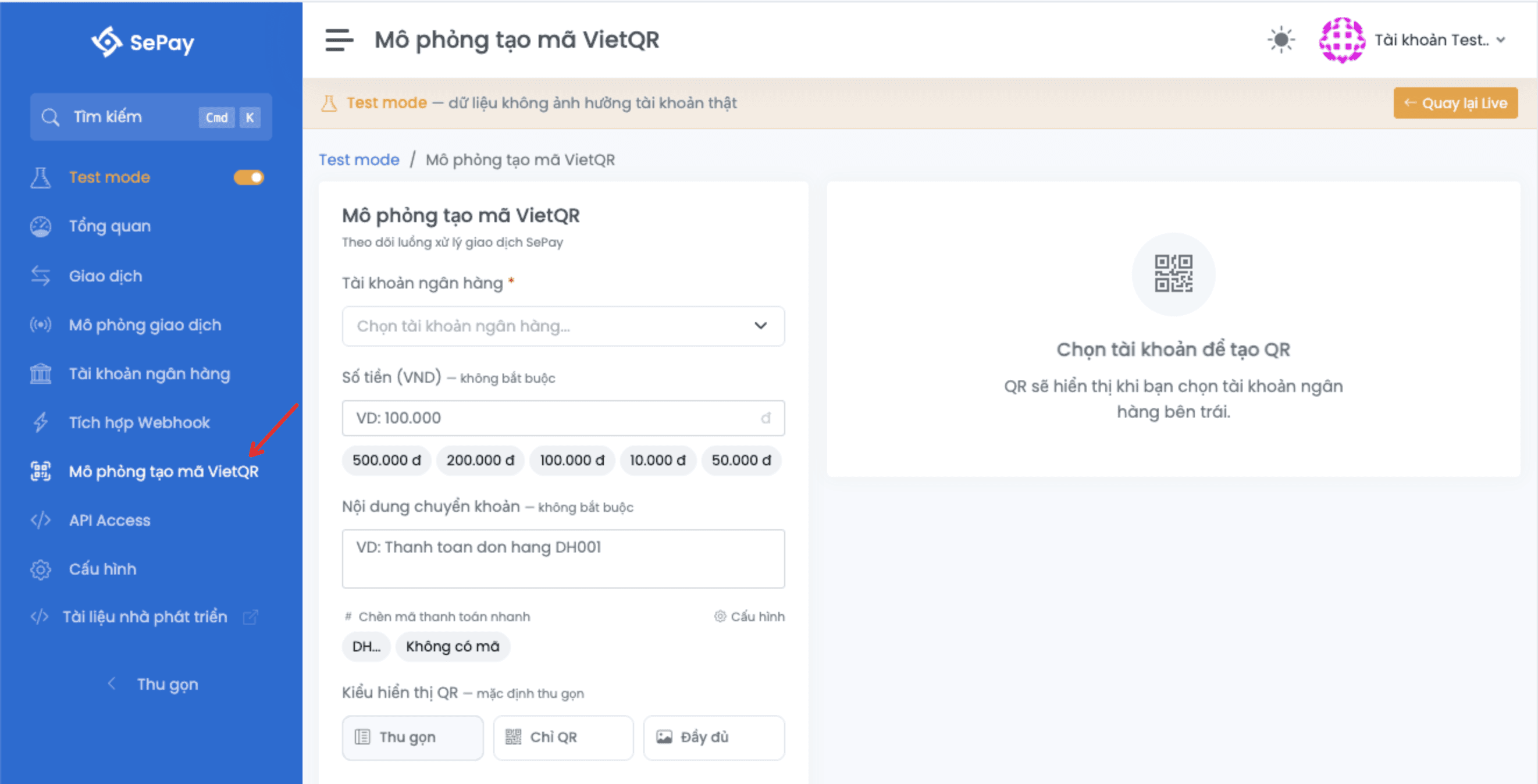
Form fields
| Field | Required | Description |
|---|---|---|
| Bank account | Yes | Pick from the accounts created in Test mode (created fresh or replicated from Live). |
| Virtual account (VA) | Conditional | Appears after you pick an account. Required for OCB, KienLongBank, MSB (all account types) and BIDV (individual, business household); optional for the rest. |
| Amount | No | VND, minimum 1,000, maximum 499,000,000. Enter as 100000 or 100.000. Leave blank to let the customer enter it when scanning. |
| Transfer content | No | Up to 200 characters, diacritics stripped automatically. As you type, the system detects payment codes per your code configuration and shows a result chip above the field. |
| QR template | Yes | Thu gọn (Compact, default), Chỉ QR (QR only) or Đầy đủ (Full). Controls how the QR and the accompanying account info are displayed. |
When you have an active payment-code template in Configuration, the QR page shows shortcut buttons above the Nội dung chuyển khoản (Transfer content) field. Click a shortcut to insert a valid code into the content.

When a VA is required
Some banks require the QR to carry a VA. The form locks the QR preview button until you select a VA:
| Bank | Account type | VA |
|---|---|---|
| OCB | All types | Required |
| KienLongBank | All types | Required |
| MSB | All types | Required |
| BIDV | Individual, business household | Required |
| BIDV | Business | Optional |
| Other banks | All types | Optional |
The Quy tắc theo ngân hàng (Per-bank rules) button on the page opens a detail dialog listing the full VA conditions, transfer-content rules (for example VietinBank requires the SEVQR prefix), and QR URL parameter rules.
For per-bank rules and the full parameter list, see Generate VietQR.
Preview and simulate the QR scan
The right-hand panel updates whenever you change a value in the form:
- The QR image in the center
- Below it, an info table with the bank name, account number (or VA), account holder name, amount and transfer content
- A Mô phỏng chuyển khoản (Simulate transfer) button at the bottom
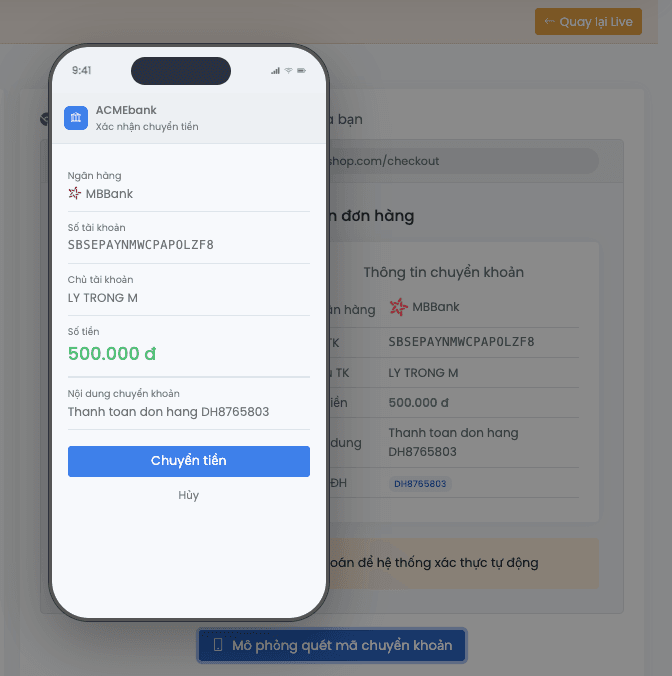
Click Mô phỏng chuyển khoản (Simulate transfer) to open a mock phone screen:
- The camera screen shows the QR you just generated
- Confirm the scan to move to the transfer-confirmation screen with the fields pre-filled (amount, content), still editable
- Click Chuyển khoản (Transfer) to finish the simulation
After the simulation, a new transaction is recorded exactly as when simulating from the Simulate transaction page. Webhooks matching that account fire.
Differences from Live QR
| Aspect | Live | Test mode |
|---|---|---|
| Source account | Real bank account | Mock bank account / VA |
| Scanned with a real banking app | Beneficiary info resolves | Beneficiary info does not resolve because the account/VA is mocked |
| Transfer | Real transfer, no simulation | Simulate transfer in the UI, no real transfer |
| Purpose | Receive real money | Verify the QR display and transfer flow before going to Live |
A QR generated in Test mode uses Test mode account parameters and is not linked to a real bank account. Scanning it with a real banking app returns an account-not-found error. Use the Mô phỏng chuyển khoản (Simulate transfer) button to mock the transaction.
Next
- Simulate transaction: create a transaction directly, without a QR
- Configure payment code structure: define the code templates the system detects in transfer content