Webhooks in Test mode (chế độ thử nghiệm) use the same creation flow, the same auth types, and the same delivery mechanism as Live. Test mode trims the wizard from 4 to 3 steps (the Alerts step is hidden) and limits the bank accounts to those created in Test mode.
Create a Test mode webhook from the Dashboard
Create at Test mode → Tích hợp Webhook (Webhook integrations) → Thêm webhook (Add webhook). The form slides in from the right and walks through three steps in order:
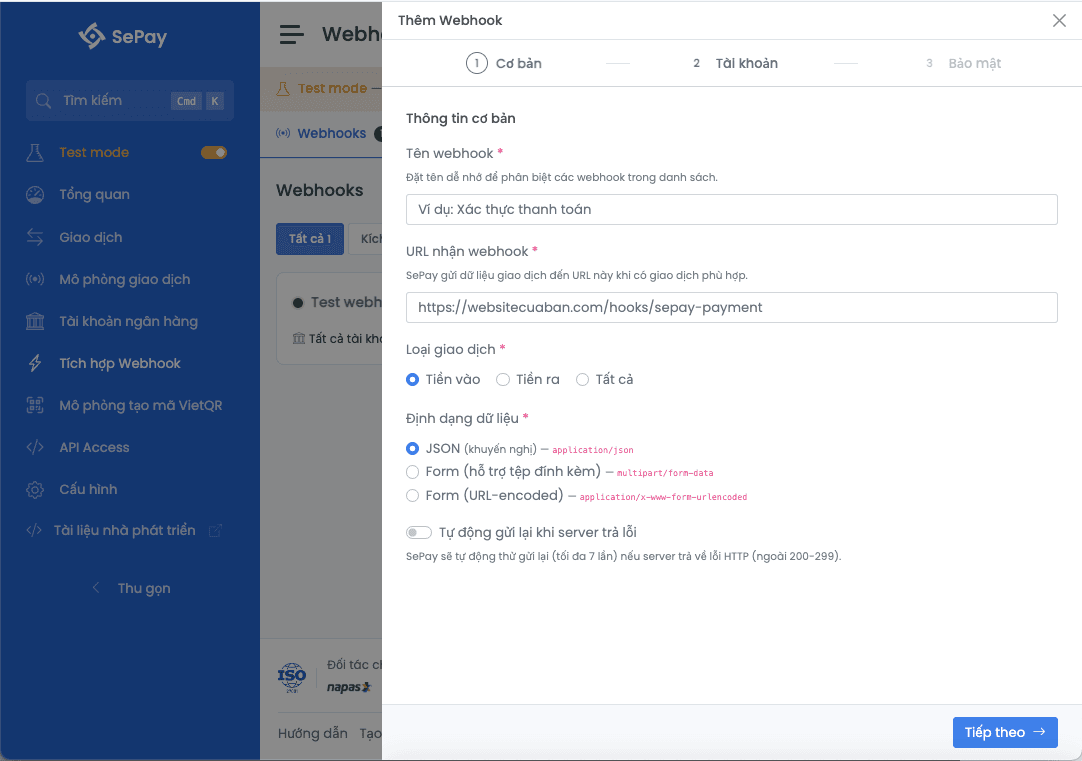
- Cơ bản (Basic): name, URL, event type, payload format, retry-on-error toggle
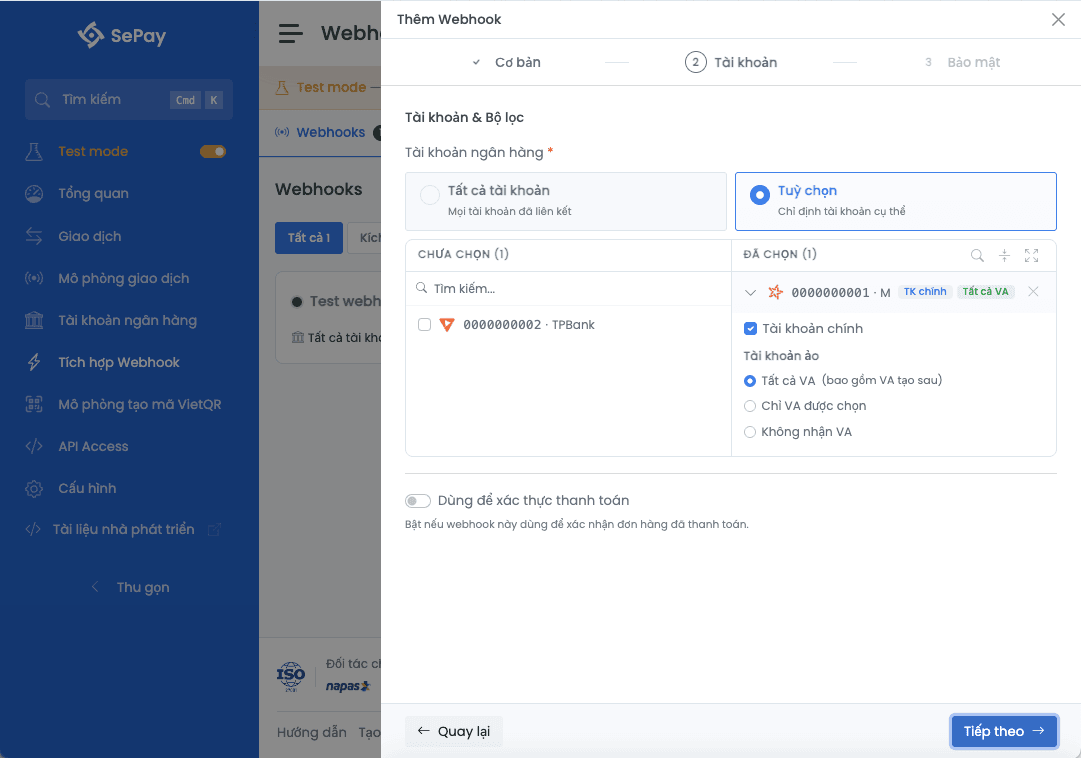
- Tài khoản (Account): pick the source accounts and the payment-code filter
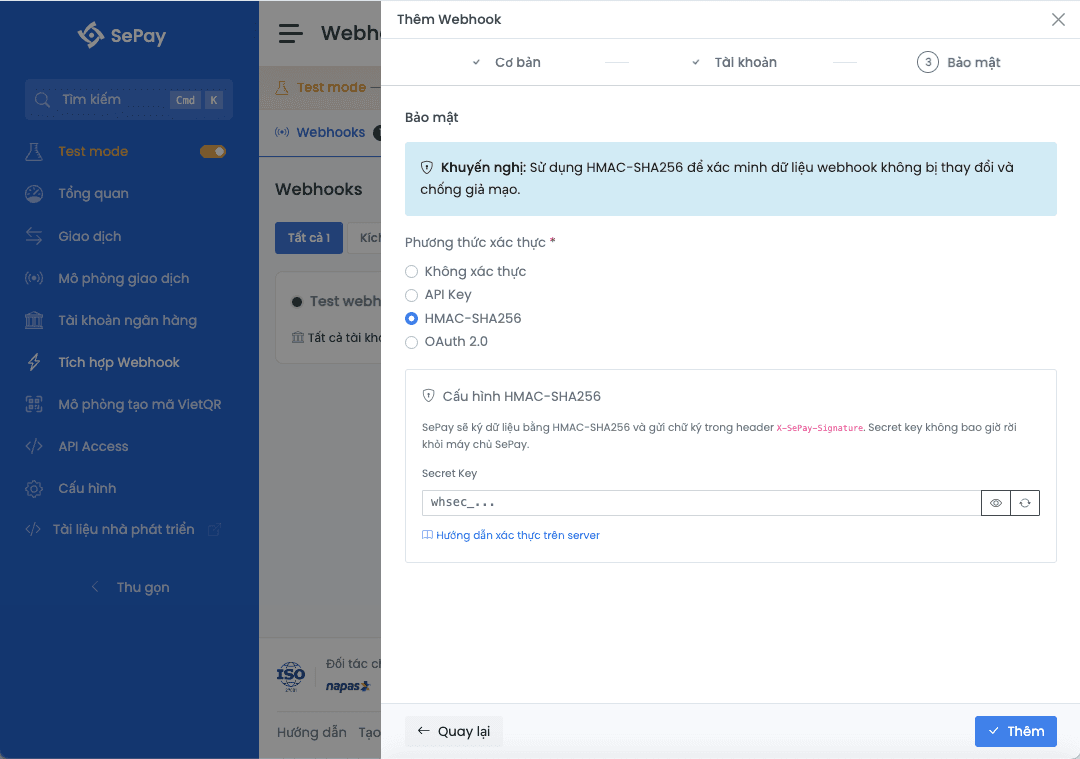
- Bảo mật (Security): pick an auth method and fill in the matching configuration
After step 3 click Thêm (Add) at the bottom of the panel to save.
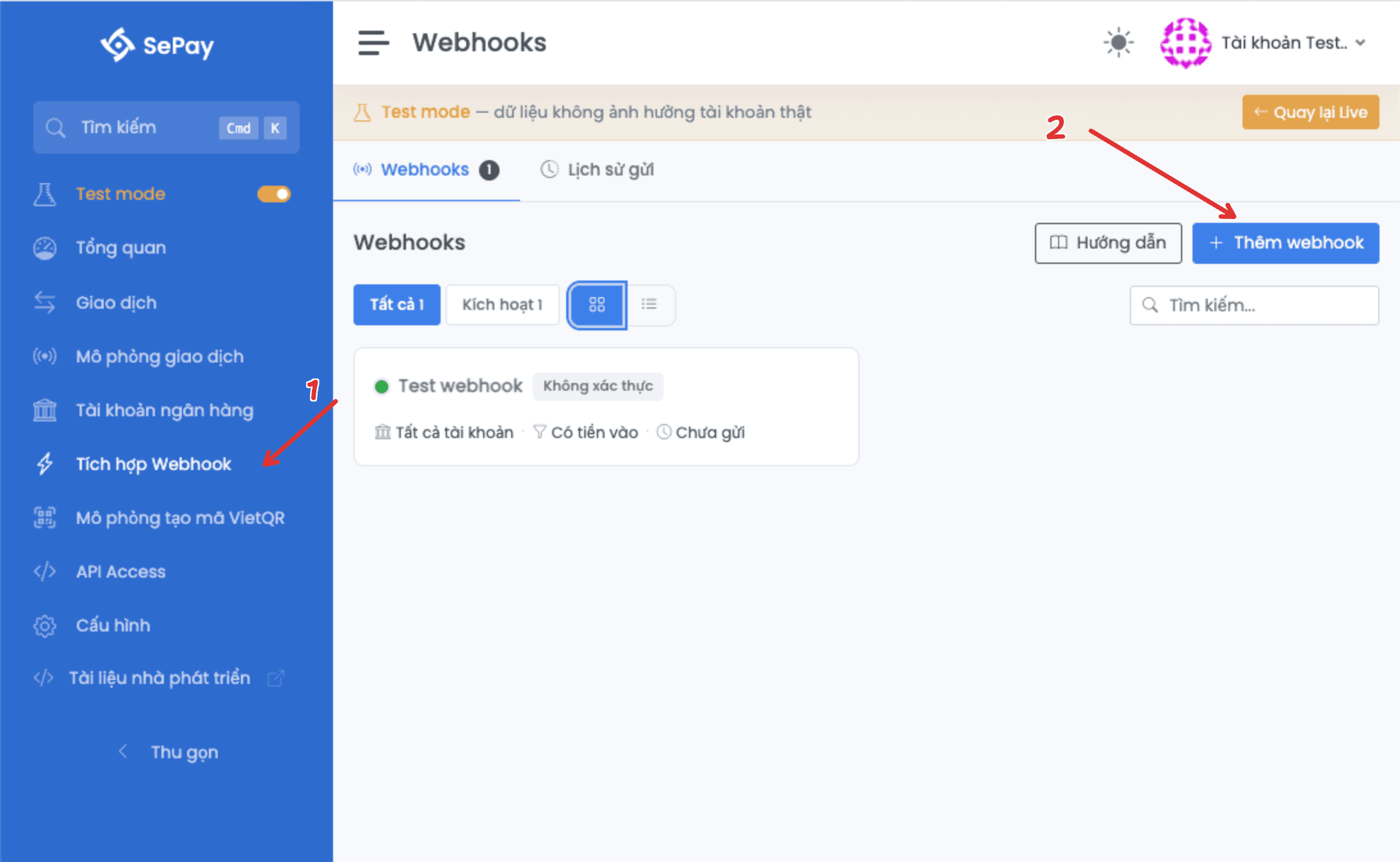
Step 1: Basic
| Field | Required | Description |
|---|---|---|
| Webhook name | Yes | Up to 300 characters. Used to distinguish webhooks in the list. Example: Payment verification. |
| Webhook URL | Yes | Up to 300 characters. SePay POSTs the transaction data to this URL. Test mode accepts HTTP and HTTPS with self-signed certificates. |
| Event type | Yes | Tiền vào (In, default), Tiền ra (Out), or Tất cả (All). |
| Payload format | Yes | JSON (application/json, recommended), Form (with file attachments) (multipart/form-data), or Form (URL-encoded) (application/x-www-form-urlencoded). |
| Auto-retry on server error | No | Enable so SePay retries automatically when the endpoint returns HTTP outside 200-299. Up to 7 attempts on the Fibonacci schedule. |
Step 2: Account
Bank accounts
| Option | Description |
|---|---|
| Tất cả tài khoản (All accounts, default) | The webhook receives every transaction from every Test mode account. |
| Tuỳ chọn (Custom) | Opens the account-tree picker (left = unselected, right = selected). Searchable and expandable/collapsible. |
Use for payment verification
Turn this toggle on when the webhook is used to confirm paid orders. When enabled, two extra filter options appear:
| Option | Description |
|---|---|
| Chỉ gửi khi có mã thanh toán (Only send when a payment code is present) | The webhook only fires when the transaction content contains a payment code (configure prefixes at Cấu hình chung → Cấu trúc mã thanh toán). |
| Lọc theo mã thanh toán (Filter by payment code) | Multi-select prefixes: the webhook only fires when the payment code starts with one of the chosen prefixes. Leave empty to accept all. |
Step 3: Security
This step shows a recommendation banner: "Use HMAC-SHA256 to verify webhook data integrity and prevent tampering."
| Auth method | Extra configuration |
|---|---|
| Không xác thực (No auth, default) | None. Suitable for quick tests; not recommended for real endpoints. |
| API Key | The API Key field. SePay sends the header Authorization: Apikey <API_KEY>. |
| HMAC-SHA256 (recommended) | The Secret Key field (with a random-key generator button). SePay signs the payload and sends the signature in the X-SePay-Signature header. The secret key never leaves SePay's servers. |
| OAuth 2.0 | Three fields: Access Token URL, Client ID, Client Secret. SePay fetches a bearer token from the Access Token URL before each delivery. |
Per-method configuration and endpoint-side verification: Webhook authentication.
Differences vs Live webhook
| Aspect | Live | Test mode |
|---|---|---|
| Webhook creation steps | 4 (includes the Alerts step) | 3 (Alerts step hidden) |
| Endpoint SSL verification | Valid certificate required | Disabled (HTTP and self-signed certs accepted) |
| Selectable bank accounts | Live accounts | Test mode accounts only |
| Maximum webhooks | Unlimited | Capped (see Test mode quotas) |
Test mode disables SSL verification so you can test against localhost or a dev server with a self-signed certificate. Before promoting the webhook to Live, ensure the endpoint has a valid HTTPS certificate.
Next
- Simulate transaction: trigger the webhook with a simulated transaction
- Test mode vs Live: differences in delivery logs, retry mechanism, payload
- Test mode quotas: up to 50 webhooks
- Bank account: you need at least one Test mode account before creating a webhook