Test mode enforces hard per-company limits on every resource. Exceeding a limit causes the operation to be rejected; no data is created.
Test mode quotas
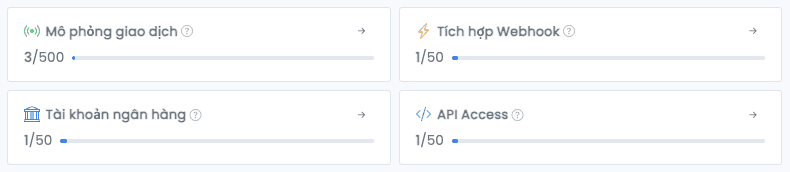
| Resource | Limit | Type |
|---|---|---|
| Simulated transactions | 500 per day | Daily, resets 00:00 Vietnam time |
| Bank accounts | 50 | Total |
| Virtual accounts (VAs) | 100 per bank account | Total |
| Webhooks | 50 | Total |
| API Access | 50 | Total |
Daily transaction-quota reset
The transaction quota resets to 0 at 00:00 Vietnam time (UTC+7) every day. After that, your company can simulate another 500 transactions.
Quota is counted by Vietnam time. At 00:00 each new day, the transaction quota is refreshed for every company.
Capture: The transaction quota bar at the top of the Mô phỏng giao dịch modal in a near-full state: a progress bar showing Đã dùng: 487/500 with the small hint "Hạn mức làm mới lúc 00:00 giờ Việt Nam". Highlight the bar and the count.
File: /images/tien-ich-khac/test-mode/han-muc-1-thanh-quota.png
Replace with: <DocImage src="/images/tien-ich-khac/test-mode/han-muc-1-thanh-quota.png" alt="Transaction quota bar in the Simulate transaction form" caption="The quota bar shows simulated-transaction usage for the day" width={780} height={120} />
When you exceed a Test mode quota
| Resource | Result |
|---|---|
| Transactions | Simulate form returns an error; no transaction created, no webhook triggered |
| Bank accounts | Cannot create a 51st bank account |
| VAs | Cannot create a 101st VA on the same bank account |
| Webhooks | Cannot create a 51st webhook |
| API Access | Cannot create a 51st token |
How to free up quota
- Transactions: wait until 00:00 Vietnam time the next day
- Bank accounts: delete an existing Test mode account in Test mode → Bank Accounts
- Webhooks: delete an existing webhook in Test mode → Webhooks
- API Access: delete an existing token in Company Settings → API Access (while in Test mode)
Deleting a Test mode bank account also removes its VAs, simulated transactions, and webhook delivery logs. This cannot be undone.
Next
- Bank account: create accounts within quota
- Create VA: official and inhouse VAs within 100 VAs per account
- Simulate transaction: use the 500 simulated transactions per day