Webhook in Test mode
SePay Webhooks Test mode runs completely separate from the Live system. Webhooks created in Test mode only receive simulated transactions; they never process real bank transactions or affect balances. Resources are capped per company: see Quotas. The steps below get a webhook receiving its first Test mode transaction in minutes.
Enable Test mode
Open Test mode in the my.sepay.vn sidebar to switch into the Test mode environment.
Create a Test mode bank account
Create a Test mode bank account to act as the source for simulated transactions.
Create a Test mode webhook
Point a webhook at your endpoint to receive payloads when transactions are simulated.
Simulate a transaction
Generate a fake transaction and confirm the webhook arrives at your endpoint within seconds.
Enable Test mode
On my.sepay.vn, click the Test mode item in the sidebar (flask icon) to flip the switch on. Or open the search (Cmd K / Ctrl K), type "Test mode", and pick the result.
Once you're in Test mode, a yellow "Test mode: data does not affect Live accounts" banner shows at the top of the page.
Test mode operations (bank accounts, webhooks, transactions) are isolated from Live data. Simulated transactions never touch real bank accounts or balances.
Create a Test mode Bank Account
Go to Test mode → Bank Accounts → Add New.
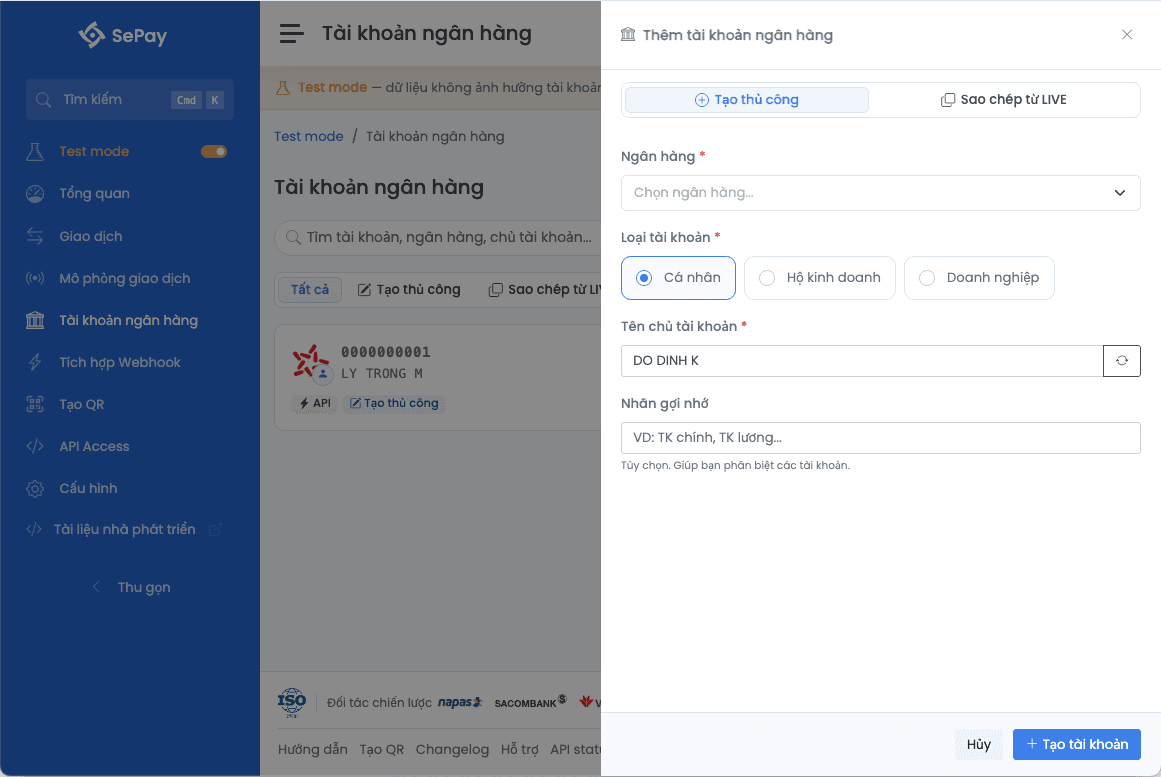
| Field | Example |
|---|---|
| Bank | MBBank |
| Account type | Individual |
Or use Replicate from Live to import your real account configuration (read-only after replication).
See details: Bank account in Test mode.
Create a Test mode Webhook
Go to Test mode → Webhooks → Add Webhook.
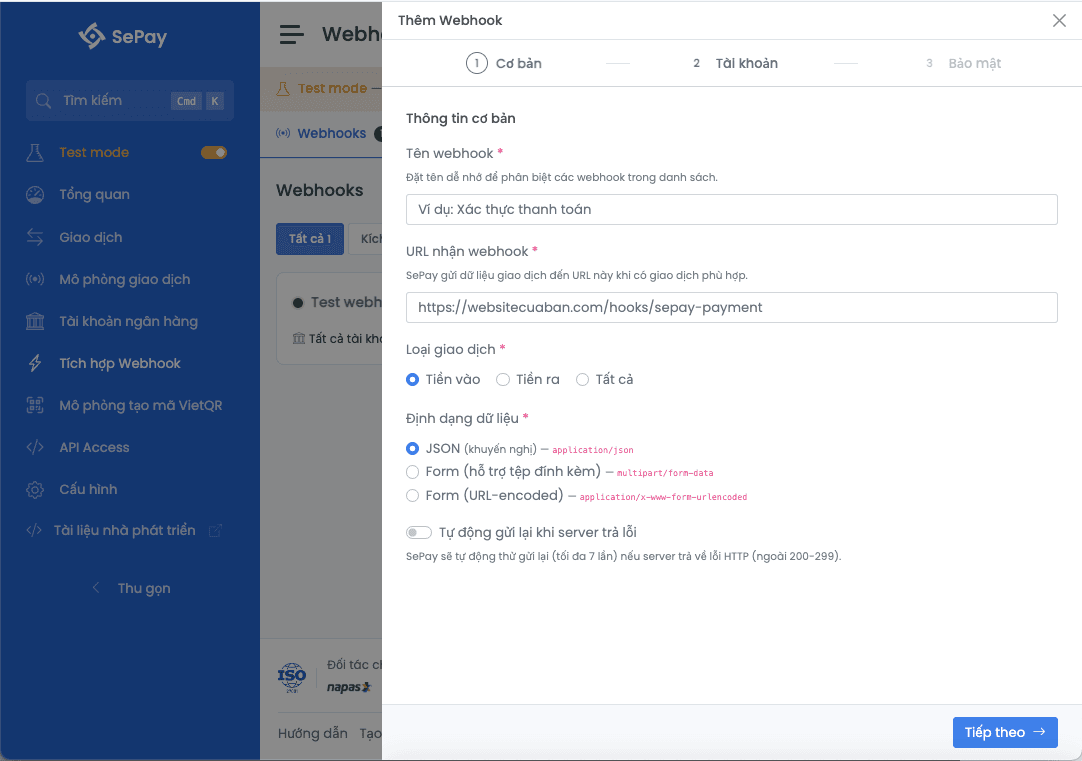
| Field | Example |
|---|---|
| Name | Test webhook |
| URL | https://webhook.site/your-uuid |
| Event type | All |
| Auth | No auth |
| Account | All |
Use webhook.site or requestbin.com to receive webhooks without a server. SSL verification is disabled in Test mode, so HTTP or self-signed cert endpoints are accepted.
See details: Create a webhook in Test mode.
Simulate a Transaction in Test mode
Go to Test mode → Transactions → Simulate.
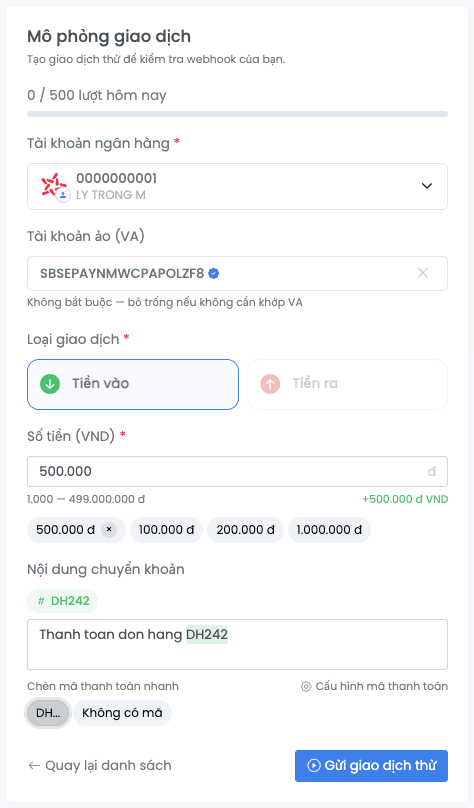
| Field | Example |
|---|---|
| Account | The account you just created |
| Type | In |
| Amount | 100,000 VND |
| Content | DH123456 payment for order |
Click Simulate. The system creates the transaction and delivers the webhook to your URL within seconds.
{
  "gateway": "MBBank",
  "transactionDate": "2025-01-15 10:30:00",
  "accountNumber": "0123456789",
  "subAccount": null,
  "code": "DH123456",
  "content": "DH123456 payment for order",
  "transferType": "in",
  "description": "NGUYEN VAN A transfer",
  "transferAmount": 100000,
  "referenceCode": "FT25015ABC123",
  "accumulated": 5000000,
  "id": 12345
}
Your endpoint must return HTTP 200 or 201 with {"success": true} for SePay to record a successful delivery. See success conditions at Integrate webhook.
Check delivery results at Test mode → Webhooks → Delivery Logs.
See details: Simulate transaction.
Next
- Test mode vs Live: what differs between Test mode and production, full webhook config and Test mode logs
- Simulate transaction: full payload reference, VA matching, daily quota
- Test mode bank account: manual and replicated
- Test mode quotas: full quota table