For a webhook to fire, two conditions must be met: your bank account is linked to SePay, and the bank supports the transaction type (money in, money out, or both). The sections below list what each bank can do and how to configure each type.
Two VA types
Official VA: the bank issues you a dedicated VA account number. Customers transfer directly into that number, and the bank and SePay both identify the transaction by that VA number.
Memo VA (TKP): there's no dedicated account number. Customers transfer into your main account with the TKP code in the transfer memo. SePay reconciles by reading the memo to figure out which TKP the transaction belongs to.
| Type | Dedicated VA number? | How transactions are identified |
|---|---|---|
| Official VA | Yes (each VA has its own number) | By the VA account number the customer transferred to |
| Memo VA (TKP) | No | By the transfer memo content |
Both types are configured under the bank account detail page on the Dashboard. TKP (short for "Tài khoản phụ", meaning sub-account) is a memo-based virtual account for banks that don't issue official VA numbers. It's useful when you need to allocate transactions per order or branch. The TKP code can appear anywhere in the transfer memo as long as it matches the configured TKP.
On the webhook side, both types appear in the payload's subAccount field. Your server handles them the same way.
Supported banks
| Bank | Official VA | Money in | Money out | Notes |
|---|---|---|---|---|
| ACB | Yes | Yes | No | |
| BIDV | Yes (required) | Yes | No | No main account, must use VA |
| MBBank | Yes | Yes | No | |
| MSB | Yes (required) | Yes | No | No main account, must use VA |
| KienlongBank | Yes (required) | Yes | No | No main account, must use VA |
| OCB | Yes (required) | Yes | No | No main account, must use VA |
| Sacombank | No | Yes | Yes | No official VA, use TKP |
| TPBank | No | Yes | Yes | No official VA, use TKP |
| VietinBank | Yes (business only) | Yes | Yes | Personal accounts have no official VA, use TKP |
| VPBank | No | Yes | No | Money-in sync only |
If your bank isn't in the table, webhook isn't supported yet. Latest list at Dashboard → Bank accounts → Add account.
The Official VA column shows whether the bank issues real VAs. Banks without official VA can still use TKP for reconciling by transfer memo.
Link an account to SePay
Each account must be linked before a webhook can use it. Go to Dashboard → Bank accounts → Add account.
Step 1: Pick the bank, choose type (personal or business), enter the account number.
Step 2: Connect the API. Enter internet banking credentials or connect via OAuth (depends on the bank). SePay runs a check; once it passes, the account flips to Active.
Step 3: Create VA (if needed). For BIDV, MSB, KienlongBank, OCB (personal): at least 1 VA is required. Other banks only need a VA if you want to allocate transactions.
Step 4: Verify. Account status must be Active (green dot). Transfer a small amount, then go to Transactions to confirm SePay received it.
A suspended or disconnected account produces no transactions. A webhook not firing here is not the webhook's fault. Check the account status first.
Select an account for the webhook
In the webhook wizard, pick one of two modes:
All accounts: the webhook receives every transaction from every linked account. New accounts linked later are picked up automatically.
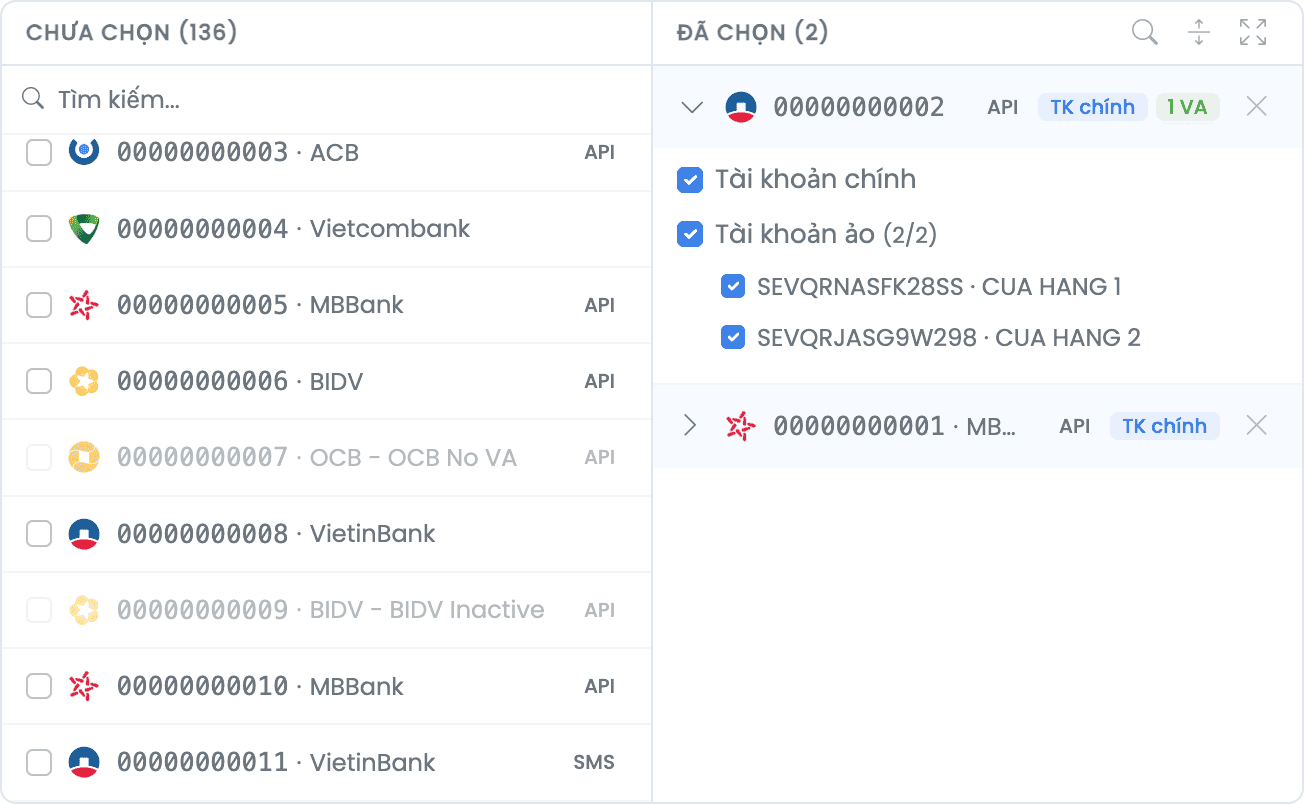
Specific accounts: pick the accounts attached to the webhook. The interface has 2 columns: accounts not yet selected on the left, accounts already added on the right. Click to add, or click ✕ to remove. Expanding a selected account reveals VA configuration.
VA configuration per bank
When you expand a selected account, the interface displays:
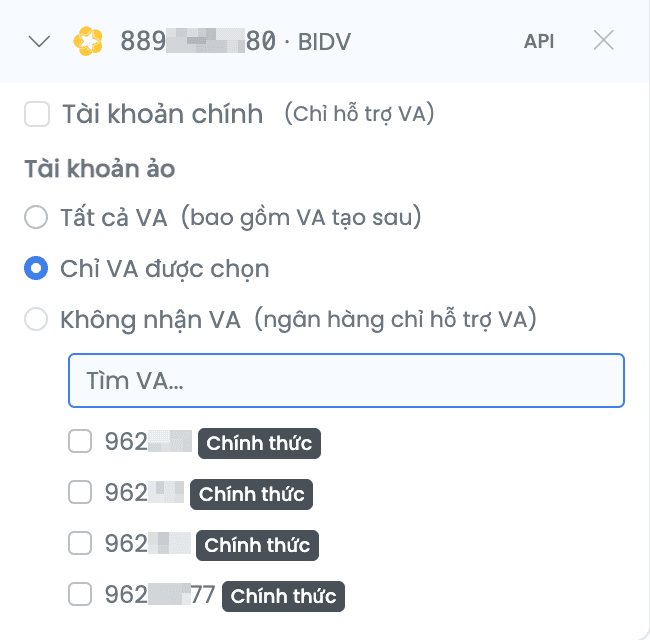
Main account checkbox: if enabled, the webhook fires on every transaction in the account, including transfers that don't use a VA. If disabled, the webhook only fires when the transaction matches a VA ticked below.
VA list: tick each VA to track. The webhook fires only when the transaction's subAccount matches a selected VA.
For BIDV, MSB, KienlongBank, OCB: the Main account checkbox is auto-locked (these banks only support VA), at least 1 VA must be selected.
Within one webhook, Bank A can receive everything while Bank B only listens to VAs. No need for two separate webhooks.
Note when choosing Money out only
Event types All and Money in only have no constraints. Money out only does:
- Banks: only Sacombank, TPBank, VietinBank are supported.
- VA: official VAs are not supported, must use TKP.
The UI blocks and warns if you try to save an invalid configuration.
Example configuration
A company has 3 accounts: Vietcombank (VCB), BIDV, and Techcombank (TCB). Requirements:
- VCB: receive every transaction.
- BIDV: only receive VA
ORDER001. - TCB: ignore entirely.
Steps:
- Selection mode: Specific accounts.
- Add VCB and BIDV to the selected column. Don't add TCB.
- Expand VCB: enable Main account.
- Expand BIDV: Main account auto-locked (BIDV is VA-only), tick VA
ORDER001.
Result:
| Transaction | Webhook fires? |
|---|---|
| Money into VCB without VA | Yes |
| Money into VCB through any VA | Yes |
Money into BIDV through VA ORDER001 | Yes |
Money into BIDV through VA ORDER002 | No |
| Money into TCB | No (not in the list) |
Next
- Create webhook: 4-step form, filters, test send
- Integrate webhook: payload and valid response
- Webhook not firing?: diagnostic checklist
Account configuration changes apply to the next transaction. Transactions already sent are unaffected.