VA Order API for BIDV Enterprise
VA (Virtual Account) Order API is a solution for automating payment confirmation for BIDV enterprise bank accounts. Instead of using a fixed VA, each order will be assigned a unique VA with an exact matching amount.
What Can You Do with This API?
SePay allows you to perform the following queries with VA Orders:
- Get list of orders
- Create a new order
- Get order details
- Create additional VA for an order
- Cancel an order
- Cancel VA of an order
Getting Started
To use the VA Order API, you need:
- Create an API Token to authenticate your API requests.
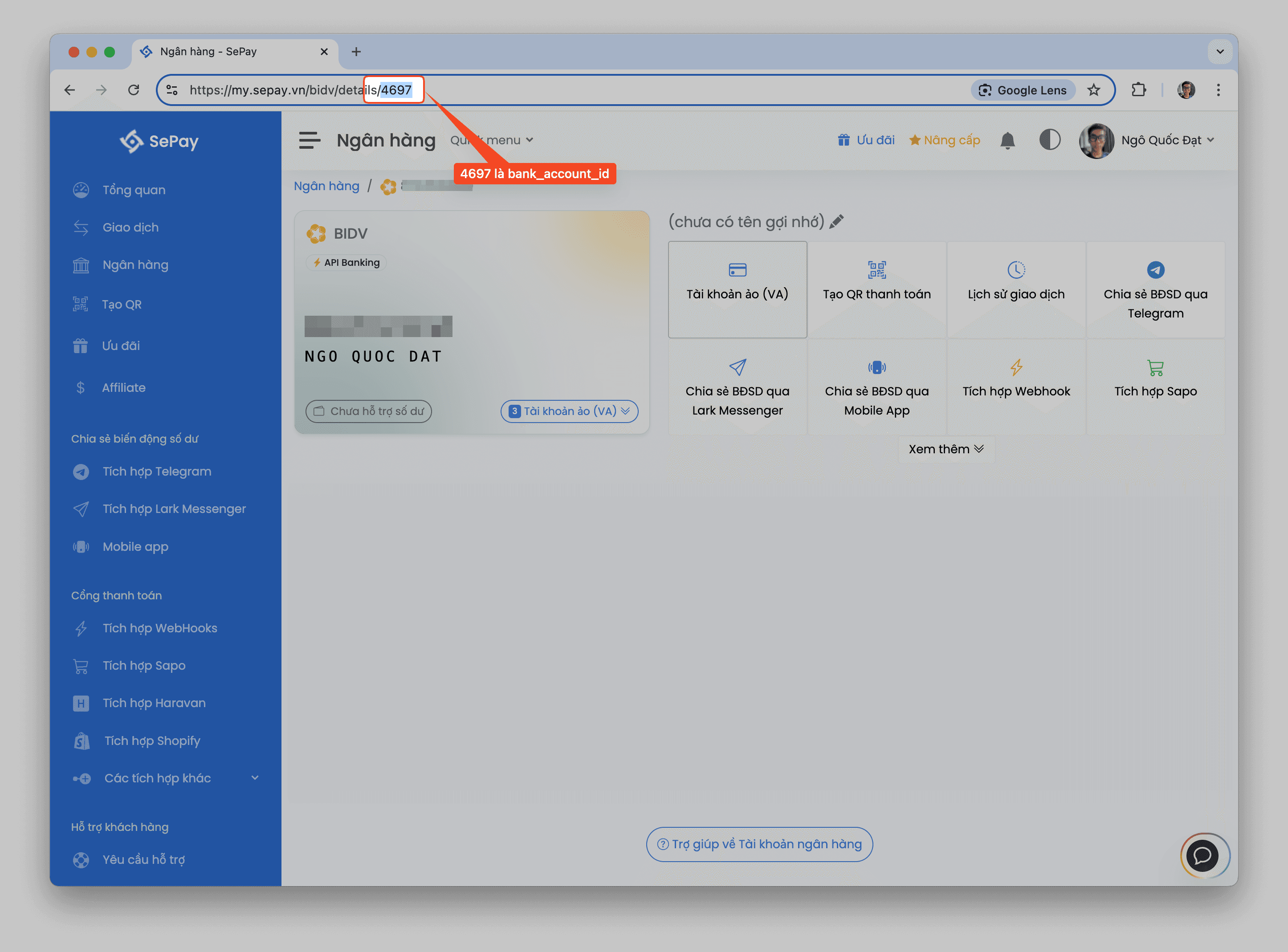
- Get the
bank_account_idof your BIDV enterprise account from the Bank Account API or directly from the bank account management interface on SePay.
Partial Payment
SePay supports partial payment for orders through the Virtual Account (VA) mechanism. When using this feature:
- You can create an order with the full amount, but allow customers to pay in multiple installments by:
- Setting the amount smaller than the order amount when creating a new VA
- Setting amount to null so that the VA can receive multiple payments with any amount until the total order amount is reached
- When a customer makes a partial payment, the order status will change to Partially
- When the total payment amount reaches the order amount, the order status will automatically change to Paid and the VA will no longer accept additional payments
This feature is especially useful for high-value orders or when customers need to pay in installments.
Get List of Orders
https://my.sepay.vn/userapi/bidv/{bank_account_id}/ordersCode Examples
curl --request GET \--url https://my.sepay.vn/userapi/bidv/123456/orders \--header 'Authorization: Bearer REPLACE_BEARER_TOKEN'
Response
{
  "status": "success",
  "data": {
    "orders": [
      {
        "id": "b64247d3-c343-11ef-9c27-52c7e9b4f41b",
        "order_code": "ORD123456789",
        "amount": 2000,
        "paid_amount": 2000,
        "status": "Paid",
        "created_at": "2024-12-26 11:41:46",
        "bank_name": "BIDV",
        "account_number": "1234567890",
        "account_holder_name": "NGO QUOC DAT",
        "va": [
          {
            "va_number": "963NQDORDRSIKYXYPTZ",
            "va_holder_name": "NGO QUOC DAT",
            "amount": 2000,
            "status": "Paid",
            "expired_at": "2024-12-26 11:51:45",
            "paid_at": "2024-12-26 11:42:12"
          }
        ]
      }
    ],
    "pagination": {
      "total": 1,
      "per_page": 20,
      "current_page": 1,
      "last_page": 1
    }
  }
}Status (success/error)
Message
Create New Order
https://my.sepay.vn/userapi/bidv/{bank_account_id}/ordersRequest Parameters
Status (success/error)
Message
The va_holder_name parameter is only supported for BIDV enterprise accounts that have the custom display name feature enabled by SePay. Please contact SePay support to enable this feature.
Code Examples
curl --request POST \--url https://my.sepay.vn/userapi/bidv/123456/orders \--header 'Authorization: Bearer REPLACE_BEARER_TOKEN' \--header 'content-type: application/json' \--data '{"amount":1000000,"order_code":"ORDER123","duration":600,"va_holder_name":"NGUYEN VAN A","with_qrcode":true}'
Response
{
  "status": "success",
  "message": "Order created successfully",
  "data": {
    "order_id": "f23cc0fe-c343-11ef-9c27-52c7e9b4f41b",
    "order_code": "ORD123456789",
    "va_number": "963NQDORDZVTBPJ3Z7H",
    "va_holder_name": "NGO QUOC DAT",
    "amount": 2000,
    "status": "Pending",
    "bank_name": "BIDV",
    "account_holder_name": "NGO QUOC DAT",
    "account_number": "1234567890",
    "expired_at": "2024-12-26 11:53:26",
    "qr_code": "data:image/png;base64,...==",
    "qr_code_url": "https://qr.sepay.vn/img?acc=..."
  }
}Status (success/error)
Message
Order Details
https://my.sepay.vn/userapi/bidv/{bank_account_id}/orders/{order_id}Get detailed information of an order by ID.
Path Parameters
Status (success/error)
Message
Code Examples
curl --request GET \--url https://my.sepay.vn/userapi/bidv/123456/orders/b64247d3-c343-11ef-9c27-52c7e9b4f41b \--header 'Authorization: Bearer REPLACE_BEARER_TOKEN'
Response
{
  "status": "success",
  "data": {
    "id": "b64247d3-c343-11ef-9c27-52c7e9b4f41b",
    "order_code": "ORD123456789",
    "amount": 2000,
    "paid_amount": 2000,
    "status": "Paid",
    "created_at": "2024-12-26 11:41:46",
    "bank_name": "BIDV",
    "account_number": "1234567890",
    "account_holder_name": "NGO QUOC DAT",
    "va": [
      {
        "va_number": "963NQDORDRSIKYXYPTZ",
        "va_holder_name": "NGO QUOC DAT",
        "amount": 2000,
        "status": "Paid",
        "expired_at": "2024-12-26 11:51:45",
        "paid_at": "2024-12-26 11:42:12"
      }
    ]
  }
}Status (success/error)
Message
Create Additional VA
https://my.sepay.vn/userapi/bidv/{bank_account_id}/orders/{order_id}/vaCreate an additional VA for an existing order.
Path Parameters
Status (success/error)
Message
Request Parameters
Status (success/error)
Message
Code Examples
curl --request POST \--url https://my.sepay.vn/userapi/bidv/123456/orders/b64247d3-c343-11ef-9c27-52c7e9b4f41b/va \--header 'Authorization: Bearer REPLACE_BEARER_TOKEN' \--header 'content-type: application/json' \--data '{"amount":500000,"va_holder_name":"NGUYEN VAN A","duration":600}'
Response
{
  "status": "success",
  "message": "VA created successfully",
  "data": {
    "va_number": "963NQDORD8DTYFPW5MV",
    "va_holder_name": "NGUYEN VAN A",
    "amount": 500000,
    "status": "Unpaid",
    "expired_at": "2024-12-26 11:55:55"
  }
}Status (success/error)
Message
Cancel Order
https://my.sepay.vn/userapi/bidv/{bank_account_id}/orders/{order_id}Path Parameters
Status (success/error)
Message
Code Examples
curl --request DELETE \--url https://my.sepay.vn/userapi/bidv/123456/orders/b64247d3-c343-11ef-9c27-52c7e9b4f41b \--header 'Authorization: Bearer REPLACE_BEARER_TOKEN'
Response
{
  "status": "success",
  "message": "Order cancelled successfully",
  "data": {
    "status": "Cancelled"
  }
}
Cancel VA
https://my.sepay.vn/userapi/bidv/{bank_account_id}/orders/{order_id}/va/{va_number}Path Parameters
Status (success/error)
Message
Code Examples
curl --request DELETE \--url https://my.sepay.vn/userapi/bidv/123456/orders/b64247d3-c343-11ef-9c27-52c7e9b4f41b/va/963NQDORD8DTYFPW5MV \--header 'Authorization: Bearer REPLACE_BEARER_TOKEN'
Response
{
  "status": "success",
  "message": "VA cancelled successfully",
  "data": {
    "status": "Cancelled"
  }
}
Handling Payment Notification Webhook
When a customer successfully pays to an order's VA, SePay will send a webhook notification to your website. The webhook data will include the code field containing the order code of that VA.
Example webhook data when VA is paid:
{
  "id": 92704,
  "gateway": "BIDV",
  "transactionDate": "2024-01-07 14:02:37",
  "code": "ORD123456789",
  "transferAmount": 2277000,
  "transferType": "in"
}
Your website needs to check the code field to identify the paid order and update the status accordingly.
For details on how to set up and handle webhooks, please refer to Webhook Integration Guide.
Status Definitions
Order Status
| Status | Description |
|---|---|
| Pending | Order not yet paid |
| Paid | Order has been paid |
| Partially | Order has been partially paid |
| Cancelled | Order has been cancelled |
VA Status
| Status | Description |
|---|---|
| Unpaid | VA not yet paid |
| Paid | VA has been paid |
| Cancelled | VA has been cancelled |
Rate Limits
SePay limits the number of API requests for orders as follows:
- 2 requests/second per IP
- Exceeding the limit will receive a 429 response code
- Header
X-SePay-UserApi-Retry-Afterindicates the time to wait before retrying
Error Codes
400Bad RequestInvalid or missing parameters.
401UnauthorizedInvalid token.
404Not FoundResource not found.
429Too Many RequestsExceeded request limit.
Create Unlimited Amount and Duration Order
You can create an order with unlimited amount and payment duration by:
- Setting
amounttonullso the order and VA have unlimited payment times - Setting
durationtonullso the order has unlimited payment time
Example:
curl -X POST "https://my.sepay.vn/userapi/bidv/123456/orders" \-H "Authorization: Bearer YOUR_API_TOKEN" \-H "Content-Type: application/json" \-d '{"amount": null,"duration": null}'
When an order is created, you can create a new VA for the order by calling the Create Additional VA API.