Introduction
SePay has implemented OAuth 2.0 authentication mechanism, enabling partners to integrate easily and securely with our system. This documentation provides detailed guidance on using OAuth 2.0 to connect with SePay API endpoints.
What is OAuth 2.0?
OAuth 2.0 is a standard authorization protocol that allows third-party applications to access user resources without needing to know their login credentials.
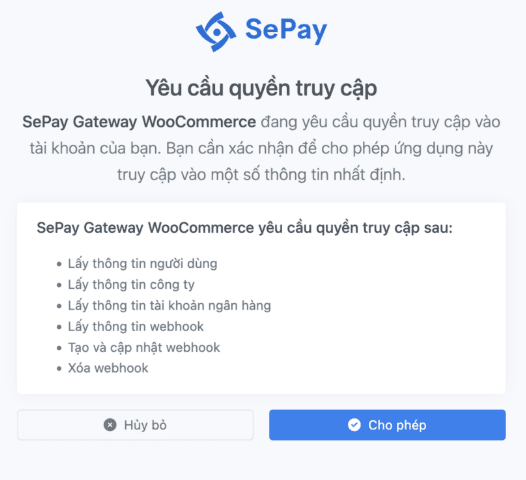
OAuth 2.0 provides the following benefits:
- Secure: No need to share login credentials with third-party applications
- Controlled: Users can limit the scope of access for applications
- Flexible: Easy to revoke access without changing passwords
- Standardized: Widely supported and adopted by many online services
Benefits of Using OAuth 2.0 with SePay
Implementing OAuth 2.0 provides significant benefits when integrating with SePay:
Secure authentication without sharing login credentials, minimizing security risks.
Detailed access control for each endpoint, helping you manage data and features being accessed.
Restrict access scope for third-party applications, ensuring only necessary permissions are granted.
Token refresh mechanism to maintain secure connections without re-authentication.
Scopes
SePay defines scopes to control access to each API:
| Scope | Description |
|---|---|
bank-account:read | Permission to read bank account information |
transaction:read | Permission to read transaction information |
webhook:read | Permission to read webhook information |
webhook:write | Permission to write webhook information |
webhook:delete | Permission to delete webhook information |
profile | Permission to read user information |
company | Permission to read company information |
When registering an application, you can request one or more scopes. Users will be prompted to authorize when authenticating.
OAuth 2.0 Flow Overview
The OAuth 2.0 flow in SePay follows the standard authentication process with the following steps:
Obtain `client_id` and `client_secret` from SePay through the Developer Portal.
Redirect users to SePay authentication screen to grant permissions.
SePay redirects users back to your application with an authorization code.
Send API request to SePay to exchange authorization code for access token.
Include access token in API request headers for authentication.
Use refresh token to obtain new access token when expired.
Details about each step in the OAuth 2.0 flow are fully documented in the Authentication Flow section
API Base URL
All SePay OAuth 2.0 APIs use a common base URL: https://my.sepay.vn/api/v1
When making API requests, you need to append the specific endpoint path after the base URL. For example:
| Endpoint | Full URL | Description |
|---|---|---|
/bank-accounts | https://my.sepay.vn/api/v1/bank-accounts | API to get list of bank accounts |
/transactions | https://my.sepay.vn/api/v1/transactions | API to get list of transactions |
/webhooks | https://my.sepay.vn/api/v1/webhooks | API to manage webhooks |
/me | https://my.sepay.vn/api/v1/me | API to get current user information |
/companies | https://my.sepay.vn/api/v1/companies | API to get company information |
API Versioning
The "v1" part in the base URL represents the API version. SePay uses this versioning system to ensure compatibility when changes are made in the future.
- Current version:
v1(https://my.sepay.vn/api/v1)
When a new API version is released, SePay will announce and update the documentation. We always ensure the old API version is maintained for a reasonable period to allow applications time to update.
All API requests must include an Access Token in the Authorization header as described in the Access Token section.